The short answer
Usually keep a temporarily unavailable product page accessible with an honest stock message, accurate offer data and useful next options. Do not permanently redirect a returning product merely because inventory reaches zero. Escalate genuinely retired products to a separate keep, replace or remove decision based on customer need and relevance.
Keep useful temporary product pages accessible
For a returning product, retaining the public page preserves a destination for shoppers seeking specifications, instructions or availability updates. Google's Temporarily pause or disable a website recommends limiting ecommerce functionality rather than taking an entire site offline during a temporary interruption. Apply the underlying operational principle at product level: keep useful information available while being clear about what can be bought.
A temporary stockout page should still identify the item accurately, retain relevant specifications and explain the current purchase status. Keep the page technically healthy when it remains a useful product destination. Do not add a permanent redirect to a broad category simply because stock is zero. A returning product would then need another URL reversal, while previous visitors lose the exact information they requested.
Avoid treating every retained stockout page as a search-growth opportunity. Its first responsibility is to serve people looking for the item honestly. If there is no reliable return information, say that clearly and provide an alternative path. A page that preserves its URL but strips all product details can become an unhelpful dead end. Retention is a content and service decision as well as a technical one.
 Keep this framework
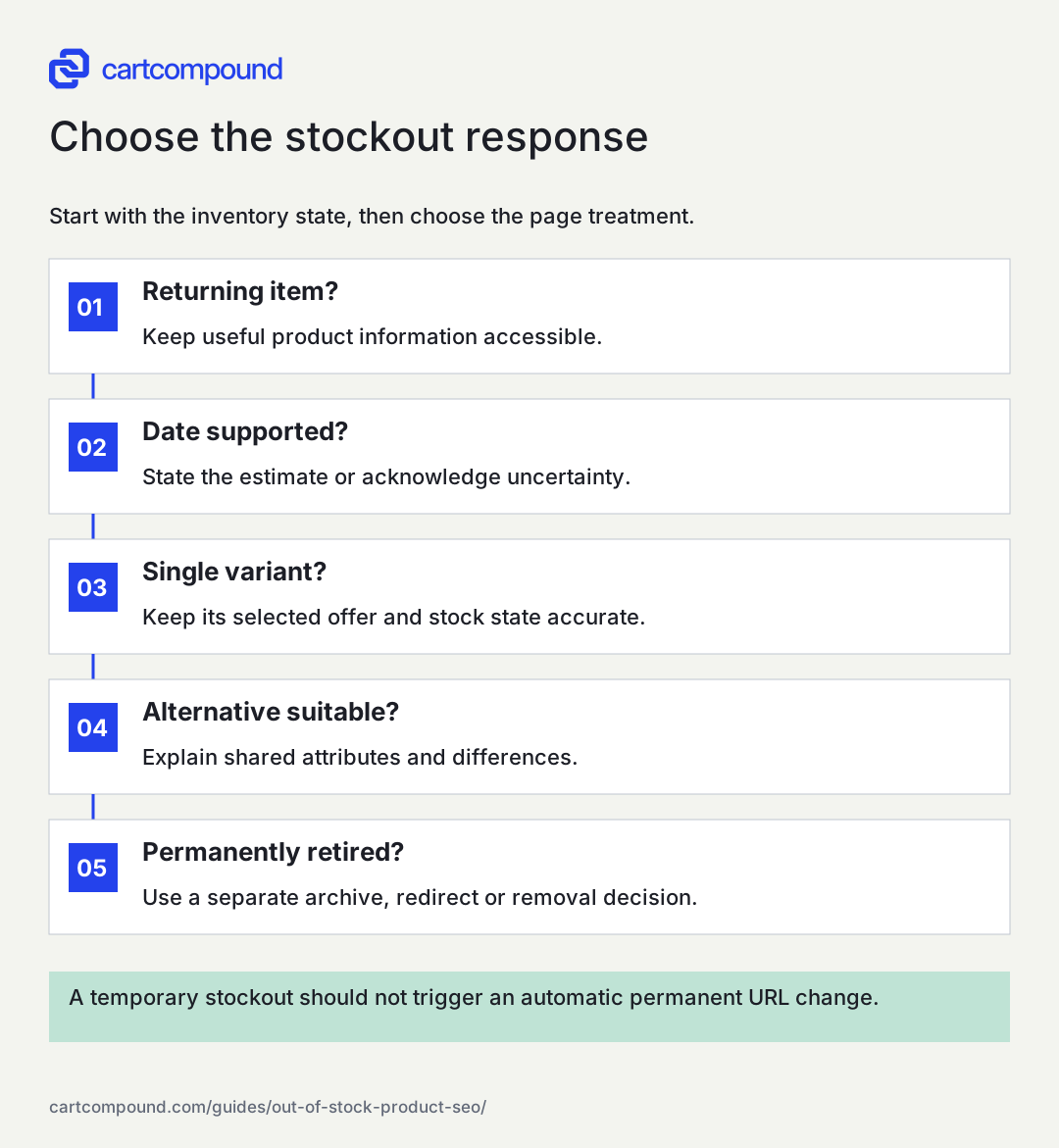
Choose the stockout response
Start with the inventory state, then choose the page treatment.
- Returning item?Keep useful product information accessible.
- Date supported?State the estimate or acknowledge uncertainty.
- Single variant?Keep its selected offer and stock state accurate.
- Alternative suitable?Explain shared attributes and differences.
- Permanently retired?Use a separate archive, redirect or removal decision.
A temporary stockout should not trigger an automatic permanent URL change.
Use the steps with your store data. Examples in this guide are illustrative unless a source is named.
Make stock communication specific without inventing certainty
Place availability near the relevant option and purchase control. If only one color is unavailable, do not imply that the whole product family is sold out. Distinguish 'currently unavailable' from 'ships later' and explain whether the customer can place an order. Test every variant combination because a default selection can conceal the actual state of the requested item.
Use a restock date only when the business has a supported estimate and a process for updating it. A vague delivery promise copied across every product can create avoidable service problems. If the date is uncertain, an honest message such as 'Restock timing is not confirmed' gives the shopper a clearer basis for choosing an alternative. Set an internal reminder to review that message.
A back-in-stock signup can be useful when the store can operate it responsibly. Explain what the signup is for, confirm the selected variant and respect the store's applicable consent practices. Do not silently treat a stock alert as blanket permission for unrelated campaigns. If alerts are not supported, do not show a form that collects requests with no accountable follow-up process. A simple link to suitable available items can be more useful than a promise the team cannot fulfill.
Reconcile page, cart, markup and product feed
Stock is represented in several systems, and they must agree about the actual offer. Compare the selected product page, cart behavior, structured data and Merchant Center source. Google's Product data specification requires availability to match the landing page, checkout and structured data. It documents supported values such as in stock, out of stock, preorder and backorder, with additional date requirements where applicable.
Check the update path when inventory changes. An inventory integration may update Shopify promptly while a feed refresh or cached page lags. Record the source of truth, sync frequency, failed-update handling and the owner who resolves exceptions. Automatic updates in a downstream system should be a safeguard, not a substitute for maintaining accurate product records.
For an illustrative jacket family, medium black is unavailable while large black remains purchasable. The medium URL should select medium, show its stock state and avoid adding large to the cart without an explicit customer choice. Product-level wording, per-variant offers and feed entries should describe their respective scope. A general 'in stock' badge on the family cannot excuse a misleading offer for the unavailable variant. Test a direct entry link, not just switching options after the page has loaded.
Offer alternatives based on the constraint that matters
A stockout page can help customers continue shopping, but a substitute must be relevant. Compare the attributes that made the original attractive: compatibility, dimensions, material, capacity, use case and price conditions. Explain meaningful differences rather than labeling everything in the department 'similar.' A product with a different fit or system requirement may be an unsafe or unusable substitute.
Build a small alternative table maintained by merchandising. For each unavailable item or family, record the closest available option, shared attributes, important differences and the reason it is appropriate. If there is no close substitute, link to the parent category or a selection guide with honest language. Do not redirect automatically just to force a continuation.
On a small screen, swipe the table to see every column.
| Stockout situation | Helpful next option | What to explain |
|---|---|---|
| One color unavailable | Same item in another color | Color change and current availability |
| Capacity unavailable | Another capacity in the family | Dimensions, price and use tradeoffs |
| Exact compatible part unavailable | Confirmed compatible replacement only | Supported models and installation differences |
| No close substitute | Relevant category or buying guide | That the original item remains unavailable |
Adjust collections and promotion without erasing the product
A retained stockout page does not have to occupy the most prominent position in every collection. Review sorting and merchandising so available options remain easy to find. Preserve useful routes for people looking for the exact product, but avoid filling a category's first screen with unavailable items when shoppers are trying to buy now.
Check campaigns, guide recommendations and navigation cards for availability-dependent wording. A guide may still discuss an unavailable product for a valid comparison, but a 'shop now' card should not promise immediate availability. Keep recommendations accurate when a stockout extends. Editorial references and product discovery have different roles, so review the context instead of deleting all links mechanically.
Search appearance does not update instantly when the page changes. Keep product facts consistent, refresh the relevant data source and allow systems to process the update. Do not toggle noindex repeatedly as a short-term merchandising control. It creates another changing signal and can interfere with the goal of keeping a returning item discoverable. If the item is permanently retired, move it into the distinct retirement process rather than stretching temporary messaging indefinitely.
Use a time-bound decision worksheet for uncertain stockouts
When a return is uncertain, the business needs a review plan. Create fields for product, current state, supplier evidence, customer demand, support value, replacement candidate, review owner and next decision date. The worksheet should allow 'unknown' as a valid answer. Requiring a made-up restock date encourages inaccurate storefront promises.
In an illustrative example, a specialty lamp has no confirmed replenishment date but still receives compatibility questions from previous buyers. Keep its information accessible, state the uncertainty and offer a confirmed alternative only if one exists. At the review date, procurement may confirm a return, retirement or a longer investigation. Each outcome changes the message and possibly the URL treatment. The review process is the useful control.
If the product is retired and a true successor exists, evaluate a relevant permanent redirect. If the page remains valuable for owners, an archive with explicit discontinued status may be appropriate. If neither a replacement nor useful information exists, removal can be correct. Google's How HTTP status codes affect Google crawlers explains status-code handling. Do not choose a permanent destination based solely on whether the old page once received traffic.
Measure recovery and keep the stock process accountable
Track stockout landing visits, alternative clicks, restock requests where available and errors caused by attempted purchases. Compare these with inventory duration and the product's normal trading pattern. Lost sales cannot be read directly from visits to an unavailable page because some visitors seek instructions or already own the product. Any estimate should state assumptions about purchase intent and substitution.
Audit a sample after stock returns. Confirm the visible message, selected option, purchase button, structured data and feed all update. Remove stale 'back soon' notes and verify that alert links land on the promised variant. Check that temporary collection sorting or campaign exclusions have an owner who restores them when appropriate.
The next action is to classify the current unavailable range using the state list at the start of this guide. Select a returning item, an uncertain item and a single-variant stockout, then test each from a fresh URL entry through the cart. Fix the first disagreement between systems and assign review dates for uncertain items. A reliable stockout process protects customer trust while allowing search systems to understand the actual availability.
Your action checklist
Use this to decide what to do next. Your checks stay on this page and are not sent or saved.
0 of 6 checked
Common questions
Should an out-of-stock product return 404?
A temporary stockout does not by itself mean the product page no longer exists. Keep a useful returning-product page accessible and accurate; evaluate permanent retirement separately.
Should I hide the price when an item is unavailable?
For products submitted to Merchant Center, its specification says the price must remain clearly visible on an out-of-stock landing page. Check the relevant source and keep the page honest about current purchase availability.
Can I redirect to a similar product until stock returns?
A temporary redirect may still confuse shoppers who need the original item. Usually a clear stock message with explicit alternatives preserves customer choice more effectively. Permanent redirects need a genuine long-term replacement decision.
Sources and review
Source documentation checked October 27, 2026. Platform features and interfaces can change. The recommendations and illustrative examples explain how to make the decision; they do not promise results.
- Temporarily pause or disable a website
Keep information accessible while temporarily limiting ecommerce functionality. - Product data specification
Merchant Center identifiers, URLs, images, variant grouping, price and availability. - How HTTP status codes affect Google crawlers
Behavior of successful responses, redirects and missing pages.
Talk through your store question
Bring one problem you want to solve.
A free 20-minute call with Hamid can help you decide what to investigate next.
Book a free 20-minute call
About the author
Hamid Khan
Hamid co-founded CartCompound and works with ecommerce founders on their stores and growth priorities.
Profile and guides