The short answer
Use one product family page when differences are selectable options within the same buying decision. Consider separate pages when each version needs a distinct, useful destination and the team can maintain it. In either model, give each purchasable variant an accessible URL that selects its actual image, price, stock and cart item.
Start by deciding whether these are options or different products
A color, size or pack configuration can be an option within one product family. A different use case, compatibility system or substantive specification may justify a separate product. The decision is not settled by whether a search phrase contains a color name. Ask how customers compare the items and what information changes their choice.
Use a product-family brief: shared purpose, attributes that vary, attributes that remain fixed, separate buying questions and operational identifiers. If visitors switch options while keeping the same description and reasoning, one family page may be the clearest experience. If each version requires different documentation, compatibility checks or a materially different explanation, separate destinations may be justified. Do not split simply to manufacture more indexed pages.
Separate page architecture from inventory architecture. The business may require a unique SKU for every size while presenting them on one product page. Conversely, separate product pages may share a family relationship in structured data. Google's Product variant structured data describes both single-page and multipage variant designs. The useful question is which model accurately expresses the catalog and remains understandable to shoppers.
Compare the page models using a decision matrix
One family page concentrates selection, common information and maintenance in a single place. Its challenge is representing the selected offer accurately without hiding important differences. Separate pages can make distinct configurations easier to explain and link to, but they add maintenance, navigation and potential duplication. Neither model guarantees stronger search performance.
On a small screen, swipe the table to see every column.
| Decision factor | One family page fits when | Separate pages may fit when |
|---|---|---|
| Buying explanation | Most information is shared | Each version needs materially different guidance |
| Selection behavior | Shoppers switch options within one task | Shoppers compare distinct uses or systems |
| Content ownership | One maintained description is realistic | Accurate distinct pages can be maintained |
| Link destination | A preselected option answers the need | A separate detailed destination is necessary |
| Catalog stability | Options frequently change within a family | Each version has an enduring independent role |
Apply the matrix to a real family before changing the entire catalog. Document the reason and exceptions. A store selling paint may need color-specific imagery and selection links without writing an independent generic essay for every shade. A store selling device accessories may need distinct pages when compatibility and installation instructions differ substantially. The catalog team's factual model should drive the SEO implementation.
 Keep this framework
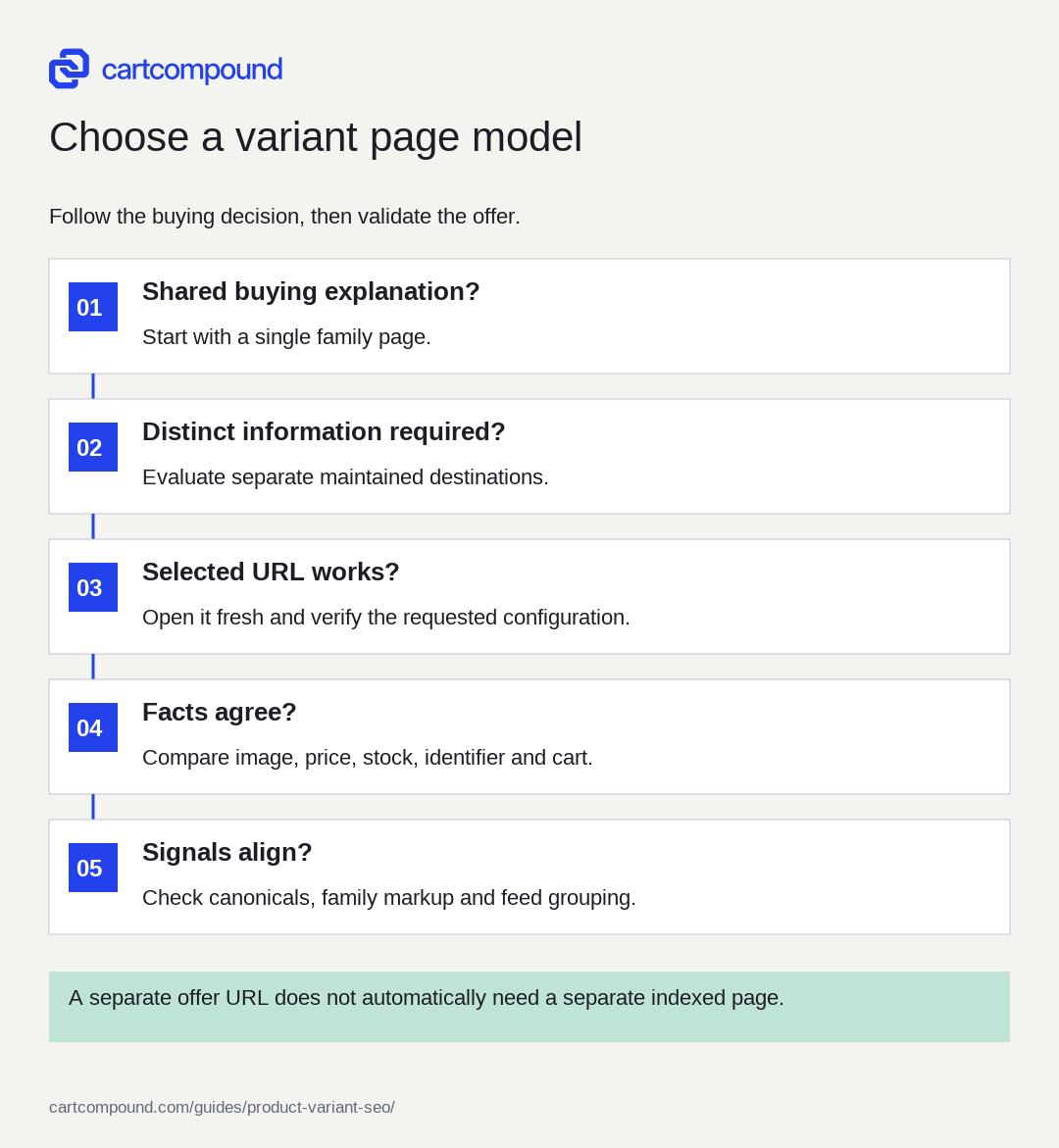
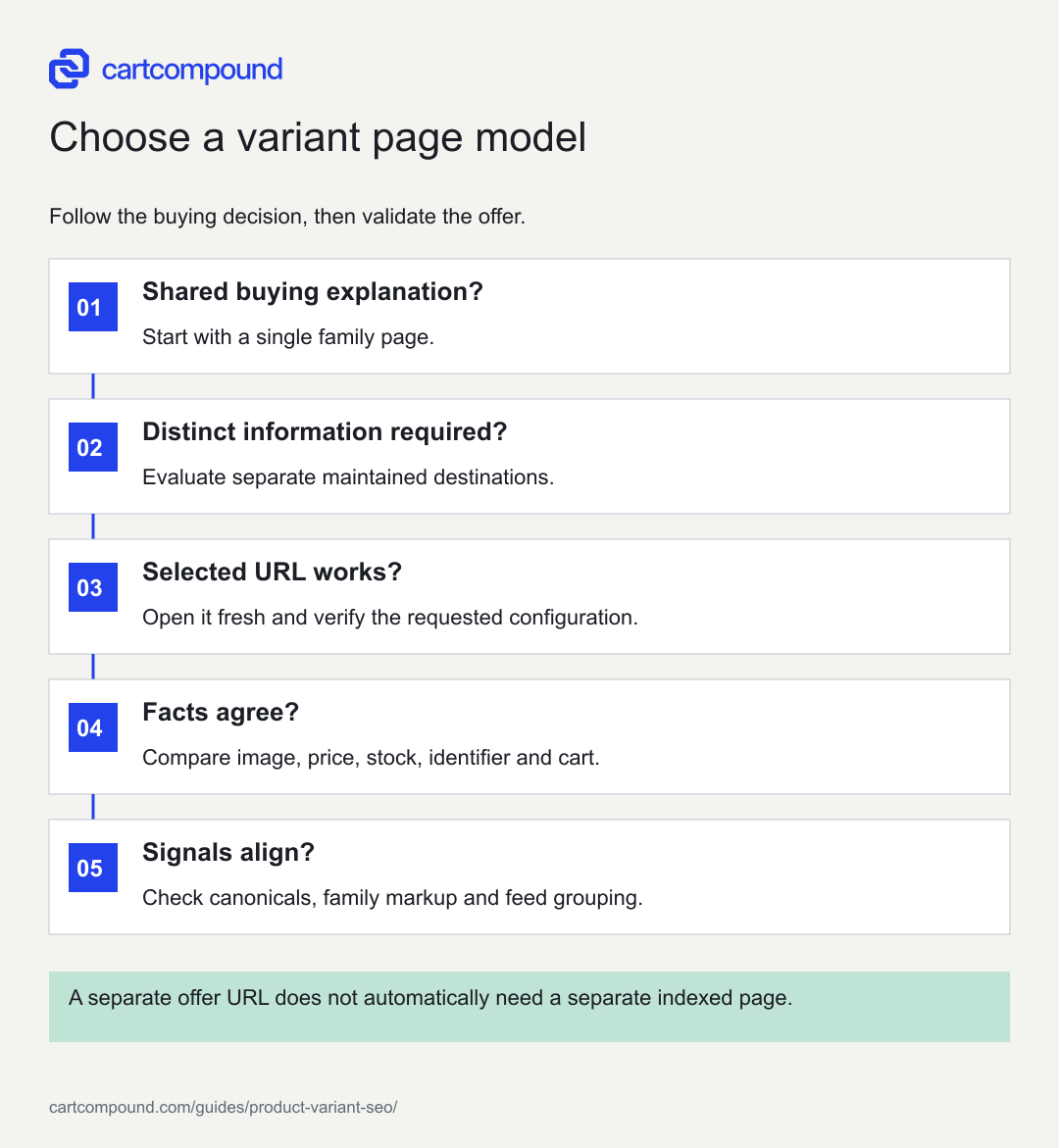
Choose a variant page model
Follow the buying decision, then validate the offer.
- Shared buying explanation?Start with a single family page.
- Distinct information required?Evaluate separate maintained destinations.
- Selected URL works?Open it fresh and verify the requested configuration.
- Facts agree?Compare image, price, stock, identifier and cart.
- Signals align?Check canonicals, family markup and feed grouping.
A separate offer URL does not automatically need a separate indexed page.
Use the steps with your store data. Examples in this guide are illustrative unless a source is named.
Make selected variants reachable and reproducible
Each purchasable variant needs an address that reliably selects it. Open the URL in a fresh session and confirm that image, price, availability and add-to-cart behavior match. Test it without assuming prior cookies, a customer account or a previous selection. A link that displays the family default while claiming to represent another option is a broken product destination.
Google's Designing a URL structure for ecommerce sites recommends identifying variants through a path or query parameter and describes canonical handling for optional query parameters. A fragment after # is not a substitute for a crawlable variant address. Use the platform's supported selection mechanism and test the actual outcome rather than inventing a new URL convention solely for search.
Keep the selected state in the address when needed for sharing, feeds and return visits. If a shopper copies the URL after choosing a color and size, another shopper should be able to recover the relevant state. Test what happens when that option becomes unavailable: the page should explain its status, not silently swap to a different item and preserve a misleading label. Do not let URL cleanup remove information required to identify the offer.
Align canonicals with the chosen architecture
For a single-page family with optional variant parameters, the base page can represent the shared product family. For a multipage setup, the relevant pages have their own roles and self-contained information. Do not apply a global base canonical without first confirming the architecture. A legitimate independent product page should not be consolidated merely because its name resembles a sibling.
Inspect current canonical output on the default product, a selected variant and any separate sibling page. Check for theme and app conflicts. A declared canonical is a preference, so confirm later what Google records rather than assuming the implementation forces selection. Google's How to specify a canonical URL explains canonical methods and their relative roles.
Use a written expectation for each pattern: family page, query-selected option, independently indexed sibling and obsolete configuration. Keep internal generic product links consistent with the intended representative, while preserving selected links where the customer needs them. Review sitemap behavior and product-data destinations separately. A sitemap used to suggest canonical pages and a feed used to land on a precise variant serve different purposes and do not have to contain identical URL sets.
Represent the family and each offer with accurate data
Product variant markup should express the actual shared family and the attributes that vary. Google's variant documentation uses ProductGroup and product-level entities to describe those relationships. Stable identifiers and explicit attributes help keep records understandable. Do not substitute a parent SKU for every variant if the systems use distinct offer identifiers.
For each offer, reconcile name, image, selected attributes, currency, active price and availability. Google recommends initial HTML for Product markup for merchant use and warns about reliability concerns with dynamically generated fast-changing data; see Google product variant guidance. That does not mean a visual selector cannot update dynamically. It means the crawler's entry point must make the relevant offer information dependable.
Check Merchant Center separately against its Product data specification. Variant grouping and identifiers have specific attribute requirements, and missing or invented identifiers can cause problems. Use legitimate product identifiers where applicable and follow the specification when they do not exist. A merchant feed does not repair inaccurate visible product information, and markup does not excuse a landing page that selects the wrong size.
Work through an illustrative product family
Consider a hypothetical insulated bottle with two capacities and three colors. The family shares material, care instructions and basic use. Capacity changes dimensions, price and weight; color changes imagery and stock. Six inventory variants do not automatically require six independently indexed pages. A well-built family page can explain capacity differences, then let shoppers select one of the six offers.
Create a test sheet with one row per variant. Record requested URL, capacity, color, SKU, image, active price, availability and cart item. For an illustrative 20-ounce navy option priced at $28 and a 32-ounce navy option priced at $34, the selected page and cart must show the correct difference. These are invented example prices, not market recommendations. If the navy 32-ounce option sells out, only its applicable state should change.
Now consider a bottle designed for a different filtration system with separate compatibility instructions. That may deserve its own product page because the buying question changes. Link the families where comparison is helpful, explain compatibility clearly and avoid using almost identical copy that hides the important distinction. The matrix produces a practical reason for the architecture, independent of hoped-for rankings.
Watch for catalog changes that break the model
New attributes can turn a simple family into an unclear set of products. Bundles, subscriptions, regional versions and custom engraving can introduce different pricing or fulfillment logic. Review whether the selected address still identifies a clear offer and whether public price information includes the relevant conditions. Do not expose a subscription-only price as a general offer without explanation.
Consolidations and splits also require URL planning. If several product pages become one family, map each old page to a genuinely relevant destination that preserves the selected configuration where possible. If one family splits into separate pages, update internal links, feeds and references together. Avoid unnecessary changes to established URLs when the current structure is accurate and usable.
Keep reviews and claims tied to the products they actually describe. Shared family presentation does not authorize inventing reviews for every configuration or copying an unsupported performance claim to a variant with different specifications. Ask the product owner which properties remain true across the family. The same discipline protects customer understanding, structured information and future catalog maintenance.
Validate the complete variant journey and choose the next action
Run a matrix across default selection, every distinct price level, available and unavailable options, sale states and market versions. Where the family is large, sample attribute boundaries and automate factual comparisons using stable identifiers. Still complete a human purchase-path check because the right data can coexist with an unusable selector.
Measure the experience through option selection, add-to-cart errors, relevant landing-page behavior and support questions. Search data can show whether the intended pages receive relevant impressions, but should be read alongside stock and catalog changes. More indexed variant URLs are not inherently a success, and fewer URLs are not inherently an improvement. The goal is accurate discovery and a clear buying decision.
The next action is to choose one complicated product family and complete the architecture matrix with merchandising and development. Write the selected URL behavior and canonical expectation before implementation. Produce an acceptance sheet showing that a fresh visit lands on the requested option and adds the intended SKU. Once that family works reliably, apply the pattern to comparable products with documented exceptions.
Your action checklist
Use this to decide what to do next. Your checks stay on this page and are not sent or saved.
0 of 6 checked
Common questions
Does every color need an indexed page?
No. Each color may need a reachable selected URL without needing an independently indexed landing page. Separate destinations should earn their role through distinct customer needs and maintainable information.
Can query parameters identify variants?
Yes, when they reliably preselect the configuration. Test the link, visible offer, structured data and cart together, and align the canonical approach with the page architecture.
Should all variants share the same GTIN?
Do not invent or duplicate identifiers to simplify SEO. Follow the actual manufacturer identifiers and Merchant Center specification for the product and variant relationship.
Sources and review
Source documentation checked October 27, 2026. Platform features and interfaces can change. The recommendations and illustrative examples explain how to make the decision; they do not promise results.
- Product variant structured data
Single-page and multipage ProductGroup designs and selectable variant URLs. - Designing a URL structure for ecommerce sites
Consistent product and variant URLs and handling empty categories. - How to specify a canonical URL
Canonical signals, consistent internal links, and limits of canonical declarations. - Product data specification
Merchant Center identifiers, URLs, images, variant grouping, price and availability.
Talk through your store question
Bring one problem you want to solve.
A free 20-minute call with Hamid can help you decide what to investigate next.
Book a free 20-minute call
About the author
Hamid Khan
Hamid co-founded CartCompound and works with ecommerce founders on their stores and growth priorities.
Profile and guides