The short answer
Match each category to a clear shopping need, show relevant available products and make every important item reachable through normal links. Add concise guidance where it improves selection. Keep duplicate sort and filter states under control, and measure discovery and purchase behavior separately.
Start with a shopping task instead of a text quota
A category page is a selection tool. It helps someone narrow a broad need into a manageable set of products. SEO work begins with that job: what is the visitor trying to buy, which constraints matter and can this assortment satisfy the promise? A page titled 'small apartment desks' needs desks that meet a defensible definition of small, with dimensions easy to compare. A long introduction cannot compensate for an unrelated grid.
Review the actual search results for the proposed query and nearby terms. Note whether results are collections, individual products, comparisons or educational articles. This is a qualitative intent check, not proof of traffic volume. Compare it with store search, customer questions and query data from pages already receiving impressions. If shoppers need to understand a concept before selecting items, a guide linked to the category may serve them better than forcing all explanation above the grid.
Write a category brief in one sentence: 'Help [customer] select [product type] for [constraint].' Then specify inclusions and exclusions. Merchandising and content should agree on these rules. A stable category definition makes future stock additions easier to review and reduces the chance that the page quietly changes meaning while keeping the same title and search promise.
Choose the category boundary and hierarchy
Create categories around meaningful differences in how customers shop. Product type, compatible system, intended use and durable attributes can justify separate destinations. Arbitrary combinations of every filter value usually do not. Ask whether a new page would offer a different selection decision, whether the business can maintain its assortment and whether someone would intentionally navigate to it.
Draw a short hierarchy from the homepage through the department to the category and products. Google recommends crawlable links connecting these levels; see Help Google understand your ecommerce site structure. A category does not need to occupy the primary menu to be useful, but it should have a logical incoming path. A parent collection can introduce narrower choices, and related guides can link to the appropriate category when the reader reaches a buying decision.
Avoid launching several near-identical categories because the search phrases differ slightly. For example, 'compact desks' and 'desks for small spaces' may be one task unless the assortment or selection criteria differ. Map overlapping phrases to a primary page, then review real query and conversion evidence. Separating pages is a product decision with maintenance costs, not an automatic response to finding another keyword.
 Keep this framework
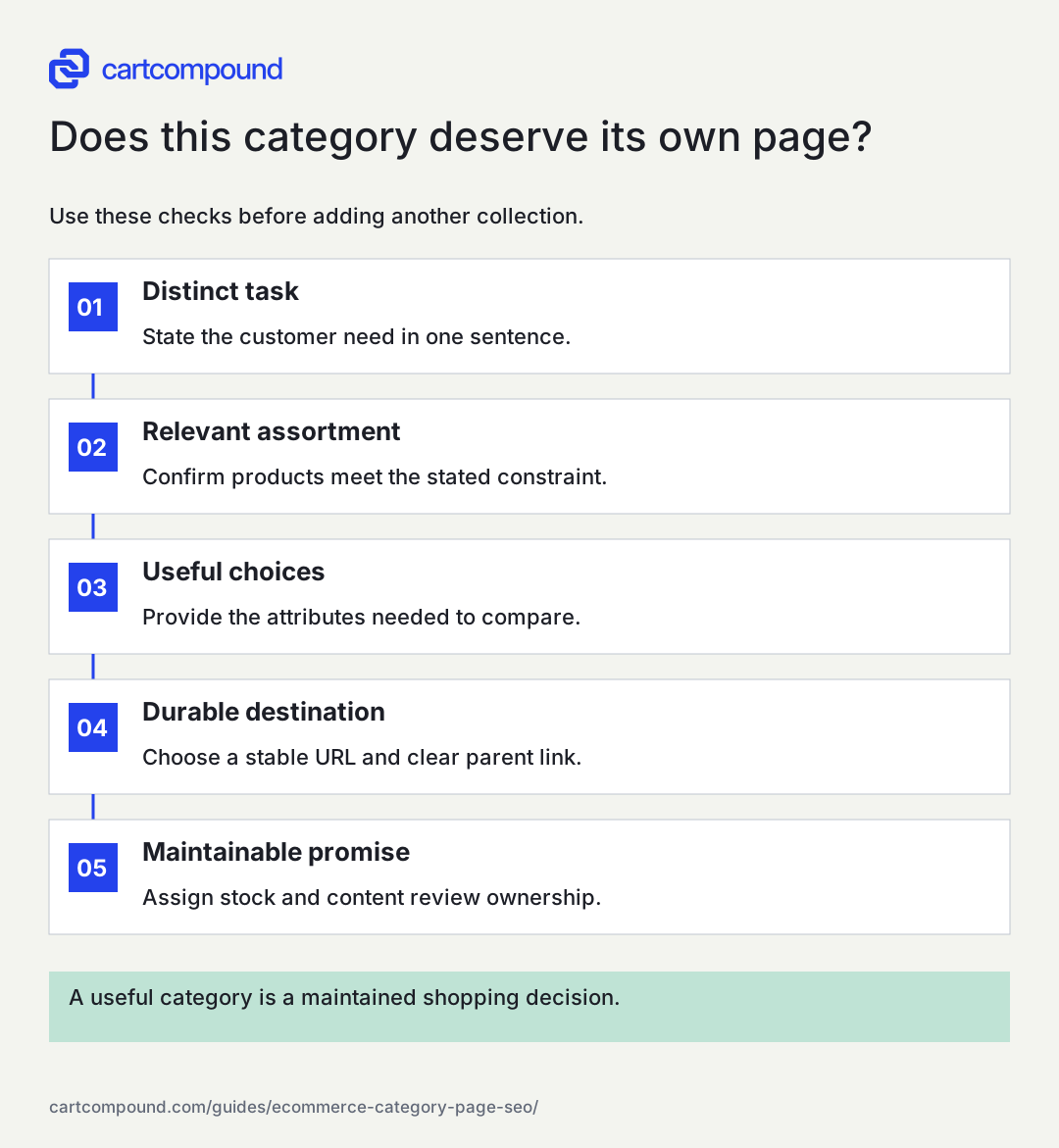
Does this category deserve its own page?
Use these checks before adding another collection.
- Distinct taskState the customer need in one sentence.
- Relevant assortmentConfirm products meet the stated constraint.
- Useful choicesProvide the attributes needed to compare.
- Durable destinationChoose a stable URL and clear parent link.
- Maintainable promiseAssign stock and content review ownership.
A useful category is a maintained shopping decision.
Use the steps with your store data. Examples in this guide are illustrative unless a source is named.
Design the first screen to confirm the promise
The first screen should identify the category, explain any necessary boundary and expose the shopping controls. A short introduction can define what is included or explain the strongest selection factor. It should not delay the grid with a generic essay about the importance of the product. On mobile, check the actual scroll distance to the first useful item and the ease of opening filters.
Product cards need enough information to support comparison. Depending on the product, that may include dimensions, capacity, pack quantity or compatibility as well as name, price and stock. Select attributes that change the decision. Showing every specification creates noise; showing none forces shoppers to open many pages just to find a basic constraint. Make variant-dependent starting prices and availability understandable.
Use headings that reflect the assortment in familiar language. A title tag can help distinguish the page, but avoid adding unsupported claims such as 'best' or 'lowest price.' Keep promotions truthful and time-bound where appropriate. Confirm that headings, cards and introductory copy remain readable when product names wrap, prices change and sale badges appear. The category must work with realistic catalog data rather than a carefully selected design sample.
Use filters to narrow choices and curated pages to serve demand
Choose filters from normalized product attributes, then test whether their values mean the same thing across the range. 'Small' is weak if it means a different measurement for every item. Numeric ranges, compatible model names and specific materials can be clearer. Show active filters and an obvious reset. A shopper should understand why a result disappeared and how to broaden the set.
Separate the interface decision from the search-index decision. Filters can be useful without each combination becoming a landing page. Evaluate a selected filter combination for durable shopping intent, sufficient relevant stock, a stable URL, clear copy and maintainable links. If it passes, create or designate a curated destination. If it fails, keep it as a utility state and choose crawl and index controls deliberately. Google's Managing crawling of faceted navigation URLs explains why unbounded filter URLs can create substantial crawl work.
An illustrative desk store might create a durable 'desks under 40 inches wide' page because that constraint is measurable and used repeatedly. It would not automatically publish every combination of width, finish, drawer count and discount. The point is to preserve useful choices without creating thousands of nearly interchangeable pages that the team cannot review when stock or product specifications change.
Make the complete assortment discoverable
A visible grid is not sufficient if most products can only be reached after clicking a script-driven 'load more' control. Test the path to later items using ordinary page links. Inspect a product that appears near the end of the assortment and confirm it has discoverable links from the category sequence. Do this on both mobile and desktop when their navigation differs.
Google's Pagination and incremental page loading recommends distinct URLs for paginated pages and treats each page in the sequence as its own page. Do not canonicalize every later grid page to page one merely because the heading is similar. The products differ, and the sequence exists to expose them. A load-more experience can coexist with crawlable paginated URLs when implemented carefully.
Check sorting as a separate issue. A price-sorted view may show the same inventory in another order and does not necessarily deserve indexing. Ensure the chosen treatment does not accidentally block the only path to deeper products. Inventory changes can move items between pages, so sample beyond a single static test. A category with a working first page and broken later paths can look healthy in a quick review while leaving a substantial portion of the range difficult to discover.
Write buying guidance that changes the decision
Use questions customers actually ask while choosing within the category. A standing-desk category might explain desktop dimensions, adjustment range and the difference between frame capacity and practical workspace. Keep detailed product specifications on product pages and link to a buying guide when the comparison requires more space. A short, relevant explanation is more useful than repeating the category name throughout several paragraphs.
Create a compact decision table for the range. Each row should connect a need to a verifiable attribute and a sensible next step. Avoid making medical, durability or performance claims that product records do not support. When the answer depends on the user's setup, explain what they need to measure or confirm. This reduces false certainty and gives the reader something concrete to do.
On a small screen, swipe the table to see every column.
| Illustrative shopper need | Check before choosing | Useful page aid |
|---|---|---|
| Fit a narrow room | Desktop width and usable chair clearance | Dimension filter and measuring note |
| Hold two monitors | Usable depth and supported mounting setup | Comparable specification labels |
| Move frequently | Assembly requirements and package details | Guide linked from relevant items |
| Match existing storage | Finish and physical measurements | Consistent images and dimensions |
Handle empty, seasonal and overlapping categories deliberately
Temporary emptiness and permanent retirement need different decisions. A seasonal category with returning stock and useful planning information may justify staying accessible. A category that no longer has an assortment or purpose may need removal or consolidation. Google's Designing a URL structure for ecommerce sites discusses noindex for categories with no items and the possibility of a 404 when an empty category is automatically removed from on-site browse and search. Apply that guidance to the actual situation rather than a blanket rule.
Do not redirect every retired category to the homepage. Select a genuinely relevant successor if one exists. If two categories are consolidated, review the products, copy, incoming links and customer expectations before choosing the destination. A page about desk accessories is not a full replacement for desks simply because both are in the same department.
Create an inventory rule for important categories: minimum viable assortment, stock review owner and seasonal return plan. These are operational decisions, not universal numeric thresholds. A specialist range can be useful with a few carefully explained products; a broad category with a thin, unrelated selection can disappoint. Check that titles and introductions still describe what is available after merchandising changes. Keep discontinued recommendations out of the guidance unless their historical role is explicit.
Measure category health and choose one next experiment
Track the category as a landing destination and as a selection tool. Search impressions and clicks show discovery; category-to-product movement, filter behavior and purchases help evaluate the shopping path. Keep country, device and brand mix visible. A category can receive more traffic while sales weaken because popular sizes are unavailable, so pair performance data with inventory notes.
Use a small diagnostic worksheet: intended query group, landing URL, assortment promise, available products, incoming links, deeper-grid access, top shopper question and current friction. Add baseline dates and the proposed change. If the page receives impressions for the intended need but visitors cannot narrow the assortment, improve attributes and controls. If it receives little discovery and lacks meaningful links, repair hierarchy before adding an FAQ.
The next action is to choose one commercially important category and audit its complete path on a phone. Write down the first three decisions a shopper must make and confirm that the page supports them with real information. Fix the clearest gap, record the change and compare later behavior with a similar trading period. Search visibility and purchases are outcomes to observe, not promises a word count or heading format can guarantee.
Your action checklist
Use this to decide what to do next. Your checks stay on this page and are not sent or saved.
0 of 6 checked
Common questions
How much copy does a category page need?
Enough to define the range and resolve selection questions. Use the product grid, filters, short explanations and linked guides together. There is no useful universal word quota.
Should every filter have an SEO page?
No. Choose only combinations with a distinct, maintainable shopping purpose and relevant assortment. Interface filters can remain useful without becoming indexed destinations.
Should page two point its canonical to page one?
For a normal paginated collection, later pages contain different products and should be handled as distinct pages. Validate the implementation against Google pagination guidance.
Sources and review
Source documentation checked October 27, 2026. Platform features and interfaces can change. The recommendations and illustrative examples explain how to make the decision; they do not promise results.
- Help Google understand your ecommerce site structure
Crawlable hierarchy and links connecting category and product pages. - Managing crawling of faceted navigation URLs
Crawl control options and consistent handling of empty or nonsensical filters. - Pagination and incremental page loading
Discoverable paginated URLs and distinct canonical pages in sequences. - Designing a URL structure for ecommerce sites
Consistent product and variant URLs and handling empty categories.
Talk through your store question
Bring one problem you want to solve.
A free 20-minute call with Hamid can help you decide what to investigate next.
Book a free 20-minute call
About the author
Hamid Khan
Hamid co-founded CartCompound and works with ecommerce founders on their stores and growth priorities.
Profile and guides