The short answer
Verify every sending service, authenticate and align the sending domain, honor permission and unsubscribe promptly, and inspect provider-specific delivery and complaint signals. A delivered status usually means server acceptance, not guaranteed inbox placement. Diagnose the affected audience and sender before changing domains or increasing volume.
Separate delivery, placement and attention
Email can be rejected, deferred, accepted into spam, accepted into the inbox or never read. These outcomes require different evidence. An email platform marking a message delivered generally indicates acceptance by the receiving server, not proof that a person saw it in their primary inbox. An open is also an imperfect indicator of human reading. Start by stating the symptom precisely.
Identify the affected period, sending service, domain, message stream and mailbox provider. A problem limited to one provider or one newly imported audience is different from a store-wide sending failure. Preserve bounce codes, deferral responses, complaint trends and recent configuration changes. Do not begin by rewriting every email or buying a new domain. First determine whether the evidence points to authentication, permission, reputation, volume, content, a technical outage or incomplete measurement. A targeted diagnosis reduces the risk of changing several variables while losing the trail of what actually failed.
Inventory every sender using the domain
List marketing campaigns, lifecycle flows, receipts, shipping apps, support systems and any staff tools that send as the brand. Record the visible From domain, sending provider, authentication setup, purpose and owner. An old app can continue sending poorly configured messages even after the main email platform is fixed. Review actual received message headers from each important stream.
Keep transactional and promotional purposes clear. A receipt and a campaign may need different operating priorities, but using separate subdomains does not erase a shared brand's reputation or permission obligations. Do not create an ever-expanding set of domains to evade poor sending practices. Check that the reply address works and a person can respond to customer questions. Clear, consistent sender identity helps recipients recognize the message. Misleading display names, fake reply prefixes and unsupported urgency are poor substitutes for a wanted message.
 Keep this framework
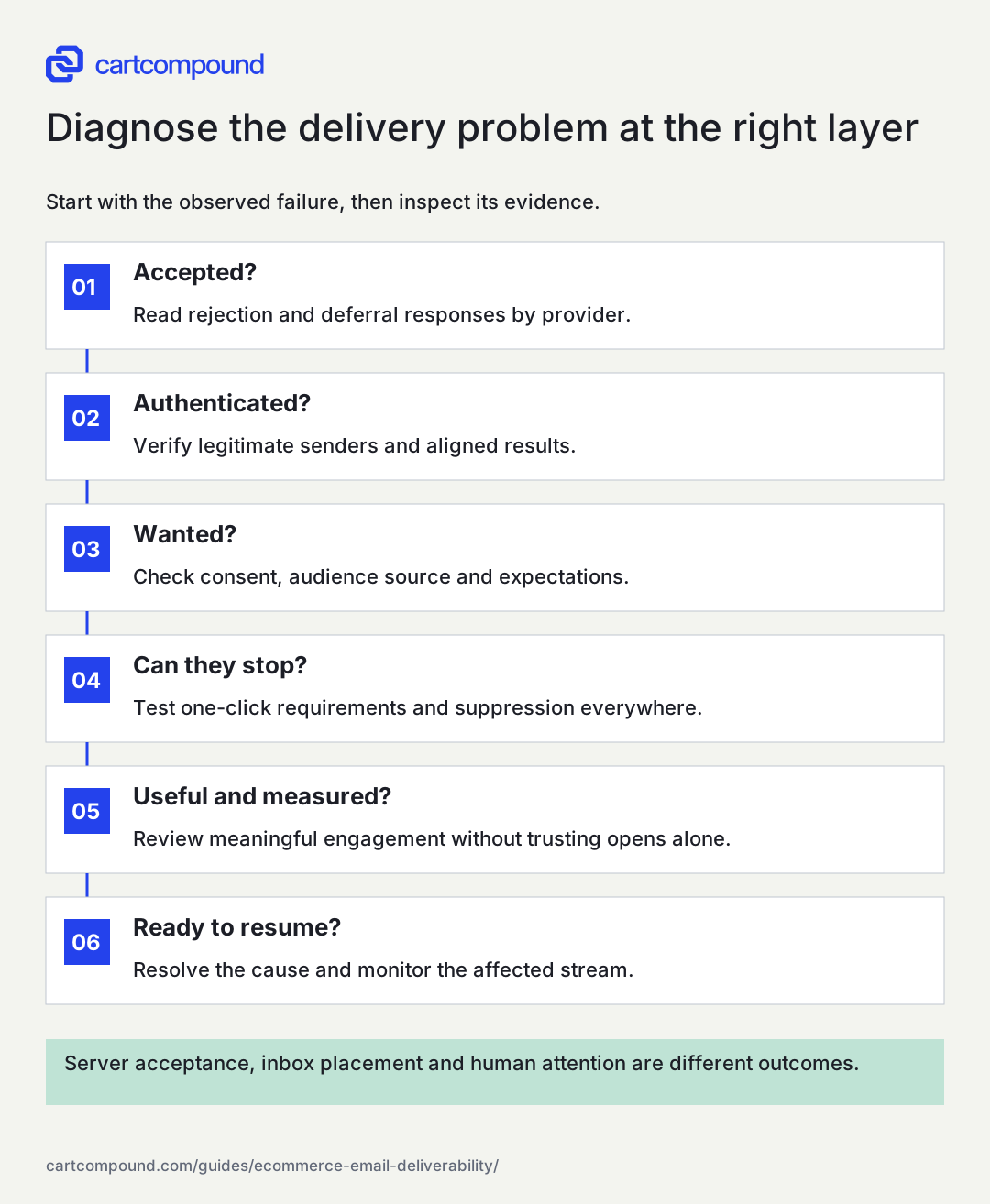
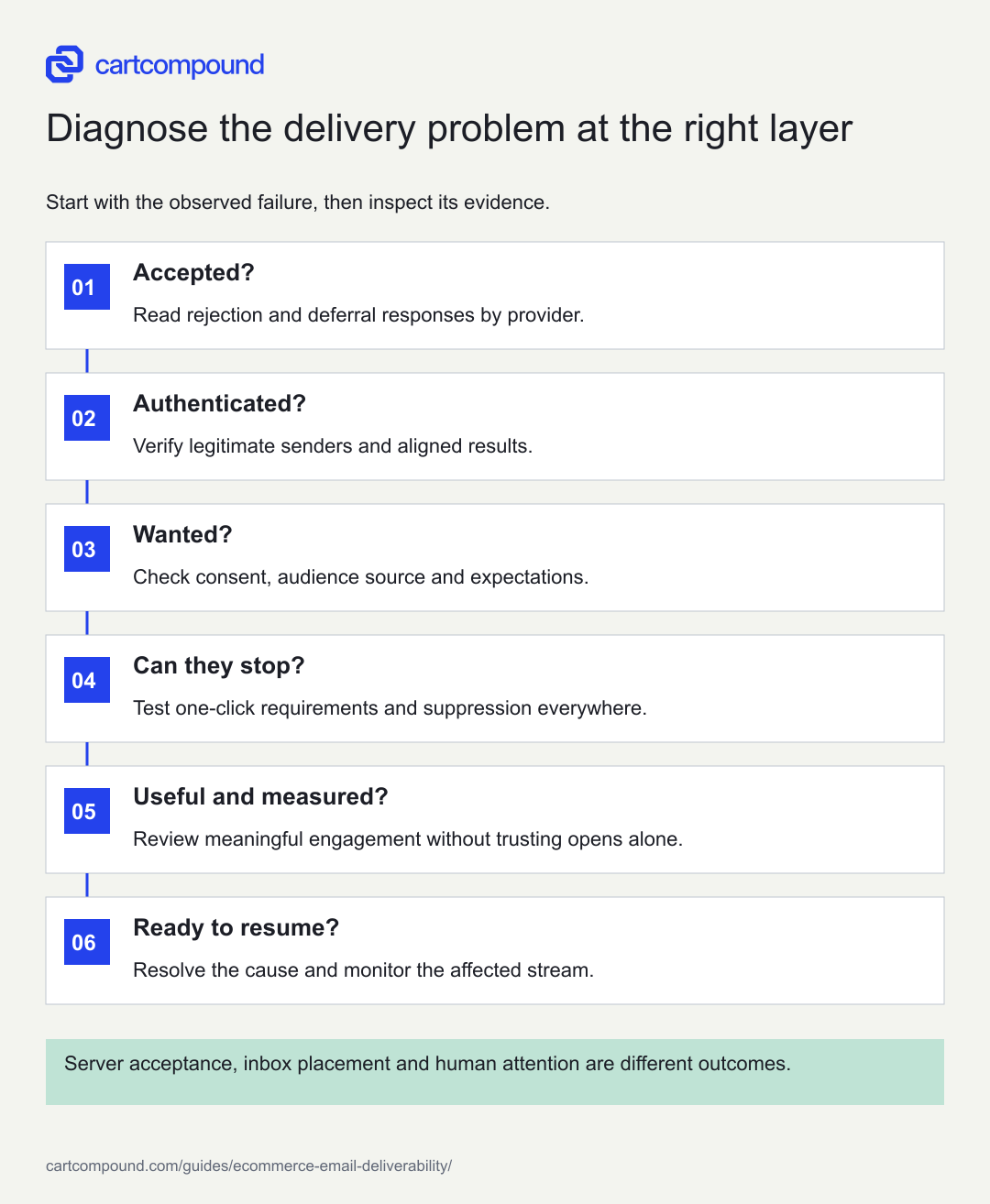
Diagnose the delivery problem at the right layer
Start with the observed failure, then inspect its evidence.
- Accepted?Read rejection and deferral responses by provider.
- Authenticated?Verify legitimate senders and aligned results.
- Wanted?Check consent, audience source and expectations.
- Can they stop?Test one-click requirements and suppression everywhere.
- Useful and measured?Review meaningful engagement without trusting opens alone.
- Ready to resume?Resolve the cause and monitor the affected stream.
Server acceptance, inbox placement and human attention are different outcomes.
Use the steps with your store data. Examples in this guide are illustrative unless a source is named.
Verify authentication and alignment
SPF identifies authorized sending infrastructure for a domain, DKIM adds a verifiable signature, and DMARC evaluates aligned authentication with the visible From domain under a published policy. Have the technical owner inspect actual results and alignment, not only the existence of DNS records. Multiple providers and old records can create configuration errors. Do not publish guessed DNS values or remove a service before confirming whether it still sends essential messages.
Google's sender requirements distinguish requirements for all senders from those sending more than 5,000 daily messages to personal Gmail accounts. The latter include SPF, DKIM, DMARC and alignment, alongside other requirements. Check the current policy and the store's sending classification. A stronger DMARC enforcement policy should follow an inventory and review of legitimate senders so valid receipts or support replies are not accidentally disrupted. Authentication is necessary infrastructure; it does not make unwanted email welcome.
Check unsubscribe behavior as a customer journey
Marketing recipients need a clear, functioning way to stop messages. Test the visible unsubscribe link and the required one-click mechanism for the providers and sending class involved. These are not always the same thing. Yahoo's sender FAQ explains that a body link alone does not meet its one-click header requirement for applicable promotional mail. Use the platform's supported implementation and verify an actual received message.
Follow the request through every sending system. A person should not unsubscribe from one campaign and be restored by a later import or another automation using an outdated list. Record how global suppression, list preferences and channel-specific consent interact. Keep preference choices understandable and avoid forcing a login to make a basic unsubscribe request. Separate permissible essential order updates from optional promotions under the applicable rules and the message's actual purpose. Test a profile already waiting in a flow, not only a newly created campaign recipient.
Review permission quality and audience sources
Trace how each audience was obtained, what the person agreed to receive and whether that expectation is still reasonable. Separate recent confirmed signups, customers with appropriate marketing permission, old inactive records and unexplained imports. A purchased or scraped list should not be treated as a deliverability growth tactic. A validator can help identify some address defects, but it does not create consent or prove the recipient wants the email.
Inspect complaint and unsubscribe patterns by signup source, age and message type. An incentive-driven signup can still be legitimate, but a form that hides its purpose may create poor expectations. Avoid automatically preselecting consent or broadening it during migration without appropriate authority. Use a documented inactivity policy based on meaningful signals and purchase context. Do not keep sending indefinitely to uninterested addresses simply because the platform allows it. Protect the ability to reach customers who want the messages by reducing avoidable unwanted mail.
Use an evidence-based diagnostic matrix
On a small screen, swipe the table to see every column.
| Symptom | Check first | Likely next action |
|---|---|---|
| Authentication failures | Headers, provider configuration and alignment | Repair the specific legitimate sender |
| Provider-specific deferrals | SMTP responses, volume and reputation signals | Follow provider guidance and control the affected stream |
| Complaints after an import | Audience provenance and expectation | Stop unsuitable audience use and preserve suppressions |
| Accepted but weak engagement | Placement evidence, relevance and measurement | Investigate rather than assuming a single cause |
| Unsubscribes fail | Link, headers and cross-system suppression | Repair immediately before discretionary sends continue |
Use the matrix to narrow the investigation, not to declare a diagnosis from one metric. Save dates and counts beside rates. A small stream can have a volatile percentage, while an aggregate rate can hide a serious problem within one acquisition source or mailbox provider.
Understand the limits of open data
Apple explains in its Mail Privacy Protection notice that remote content can be downloaded in the background regardless of engagement. This makes an apparent open an unreliable standalone sign that a person read the message. Other measurement limitations can also affect opens and clicks, including security scanning and blocked content.
Use a combination of signals: meaningful downstream actions, purchases where relevant, replies, unsubscribes, complaints and provider reports. Do not build an aggressive reactivation audience solely because every profile appears to have opened a privacy-protected message. Likewise, do not delete a valued customer relationship solely because open tracking is absent. Keep the purpose clear. Deliverability monitoring asks whether wanted messages can be received; engagement analysis asks whether people find them useful. The two influence each other, but neither is reduced to one universal open-rate target.
Work through an audience-related incident
Consider an illustrative store that imports several years of contacts and sends a promotion through its existing authenticated domain. Authentication passes, but complaints and deferrals rise in the affected stream. The team is tempted to move the audience to a new domain. That move does not fix missing permission, poor expectations or stale addresses and can spread the problem to another sender.
Pause discretionary sends to the questionable audience and preserve the evidence. Verify provenance, suppression history and the message promised at signup. Keep essential order communications under review through their legitimate sending path. Investigate provider responses and contact the sending provider through approved support channels when needed. Rebuild the eligible audience from supported records rather than treating every imported address as reachable marketing inventory. Only resume affected discretionary sending after the underlying issue is understood and the provider's requirements are met. The example demonstrates why authenticated unwanted mail remains a deliverability problem.
Plan volume changes without a guaranteed warmup formula
New sending infrastructure, major audience growth and seasonal peaks deserve a staged plan based on provider guidance and actual signals. There is no universal number of days or messages that guarantees reputation. Use wanted, appropriately permissioned mail and monitor the affected provider and message stream as volume changes. Do not manufacture opens, replies or fake engagement to simulate trust.
Keep an operational pause threshold and escalation path. Google publishes complaint-rate requirements and additional guidance in its sender documentation; follow the current provider policy rather than adopting an invented universal ecommerce benchmark. A policy ceiling should not be treated as a performance target. Review bounces, deferrals, complaints and unsubscribe processing together. If the system lacks enough data for a small sender, say so. The absence of a populated reputation dashboard is not proof that reputation is excellent or that all messages land in the inbox.
Build a provider-specific incident record
For each incident, keep a concise record containing the first observed time, affected sender, message stream, mailbox provider, audience source, volume, response codes and recent changes. Save representative headers and provider responses in an approved location with personal data minimized. Separate confirmed facts from hypotheses. “DKIM failed for receipts from provider A” is actionable evidence; “the whole brand is blacklisted” is too broad unless an authoritative source actually establishes it.
Keep rate denominators visible. A complaint figure from a mailbox provider may use a different population from the email platform's aggregate campaign report. A bounce rate can also be calculated from different stages of attempted sending. Do not compare two percentages as if they use identical denominators without checking the definitions. Use the provider's documented report meaning and preserve raw counts where available. If a low-volume stream does not produce enough reporting data, mark the gap rather than treating missing data as a zero complaint rate.
Assign an incident owner, affected discretionary sends to pause, unaffected essential communication to monitor and a condition for resuming the stream. Avoid broad DNS changes while the cause remains unclear. After correction, verify actual message results and watch the same provider and audience slice that exposed the problem. A general dashboard can recover while a small but important receipt stream still fails. Write a short closeout recording the cause supported by evidence, what changed, remaining uncertainty and the prevention step. That might be an import approval gate, sender inventory update or unsubscribe regression test. The runbook becomes more useful when each incident improves a specific control rather than producing another untested deliverability slogan.
Maintain a deliverability runbook
The runbook should identify sender owners, approved domains, authentication records, suppression ownership, monitoring sources, incident contacts and a pause procedure. Keep sensitive configuration values in the appropriate secure systems rather than placing credentials in a marketing document. Recheck when apps are installed, a platform migration occurs, a domain changes or a new agency starts sending.
For the next review, inventory the live senders, inspect actual authentication results for each essential stream, test unsubscribe through a queued flow and review audience provenance for the next campaign. Fix the highest-risk defect before increasing volume. Record what was checked and what remains uncertain. Deliverability is sustained by trustworthy infrastructure and wanted communication, with evidence collected at the provider and audience level. No template rewrite, authentication badge or software migration can promise inbox placement independent of those conditions.
Your action checklist
Use this to decide what to do next. Your checks stay on this page and are not sent or saved.
0 of 5 checked
Common questions
Does delivered mean inbox placement?
Usually it means the receiving server accepted the message. Inbox versus spam placement and human attention require different evidence.
Will SPF, DKIM and DMARC fix every problem?
No. Authentication establishes important sender controls, but permission, reputation, volume, message behavior and recipient response still matter.
Should I move to a new domain after complaints rise?
Diagnose and correct the underlying issue first. A new domain does not make an unsuitable audience or broken unsubscribe process acceptable.
Sources and review
Source documentation checked October 27, 2026. Platform features and interfaces can change. The recommendations and illustrative examples explain how to make the decision; they do not promise results.
- Email sender guidelines
Personal Gmail authentication, alignment, unsubscribe and sending requirements. - Email sender guidelines FAQ
Bulk sender classification and current enforcement context. - Yahoo Sender Hub FAQs
Applicable one-click unsubscribe header and processing requirements. - Mail Privacy Protection and Privacy
Background remote content retrieval and open measurement limitations.
Talk through your store question
Bring one problem you want to solve.
A free 20-minute call with Hamid can help you decide what to investigate next.
Book a free 20-minute call
About the author
Hamid Khan
Hamid co-founded CartCompound and works with ecommerce founders on their stores and growth priorities.
Profile and guides