Use an existing native or standard field when it fits. Use a metafield for a property attached to a product or variant, and a metaobject for a structured record with its own identity. A metafield reference can connect that record to products. Prove both the assignment and the storefront display before migrating the rest.
A clean product page can hide a messy content system. A care card might be copied into descriptions, rewritten inside a theme block and maintained in a separate spreadsheet. The immediate question is which version a future editor should trust.
I would decide the content owner and expected change impact before creating custom fields. The example below is a fictional migration plan, not product-care advice or a report of a store implementation.
Put it into practice
Product content production pack
Plan SKU-level photographs, useful demonstrations, measurements and claim review without substituting attractive assets for product evidence.
Explore this resourceStart with the content you already have
Inventory a representative simple product, a variant with different facts, an exception product and each market version before bulk entry. Record the current text exactly, its source document and approval state. Similar wording does not establish that two products can safely share one record.
Check native fields and category attributes, then matching standard definitions. Shopify lists a Product subtitle and a Care guide definition. Assess their purpose and constraints before making a duplicate custom field. A single approved care sentence might fit a standard field; a care card with a heading, body, evidence identifier and market scope is a different modeling requirement. Review the standard definitions.
Keep prices, titles and other facts already maintained in their authoritative place there. For a fact that changes by variant, record the variant as its intended owner rather than silently copying a product-level value. Put units, allowed values, blank behavior and the source of truth beside each candidate field.
See which products one shared edit affects
- Choose the smallest fitting structure. Keep a matching native field. Otherwise compare a typed resource metafield with a structured metaobject record.
- Trace the references. Identify every product pointing to the record before changing shared wording.
- Verify the consumer. Saved data is not proof of display. Check blank/unavailable content and restoration as well as the intended change.
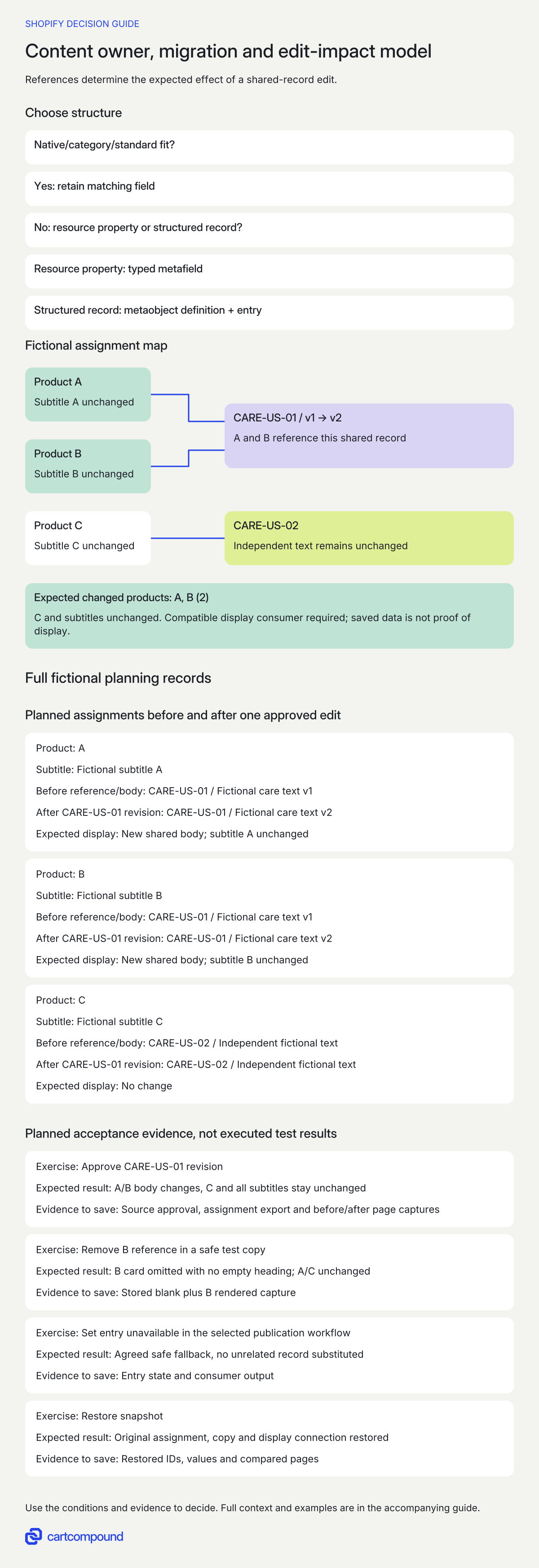
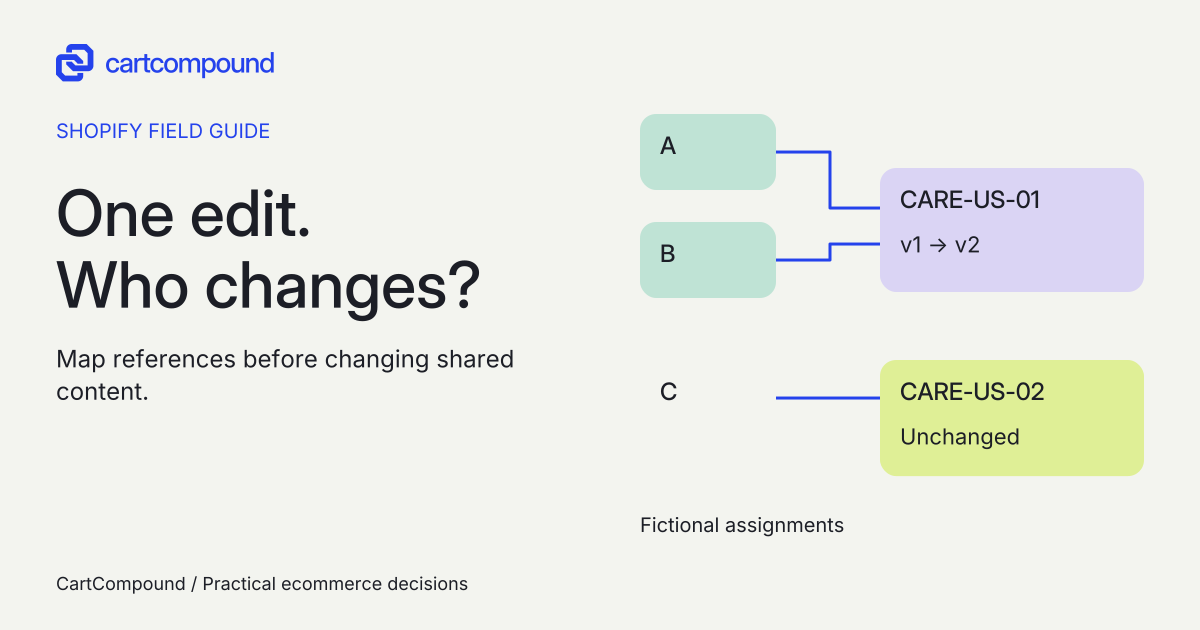
Illustrative example A and B reference CARE-US-01; C references CARE-US-02. After the approved CARE-US-01 edit, A/B care bodies are expected to change. C and all three subtitles stay unchanged.
This is an expected affected set of two products from fictional assignments, not an executed migration result.
Choose a resource property or a record with an identity
A metafield belongs to an existing resource. A metaobject is a standalone record with related fields. These can compose: a product metafield can point to a care-card entry. A definition is the shape of the care card; an entry is one card; a reference is the product-to-card assignment. Reuse is helpful, but a structured record does not need multiple consumers to justify its own identity.
| Content item | First candidate | Choose custom structure when |
|---|---|---|
| Product title or price | Existing native field | Do not duplicate solely for a new page layout. |
| Short product subtitle | Matching standard definition | Only after purpose/type constraints fail the requirement. |
| One product-specific value | Product or variant metafield | Its resource owner and typed value are clear. |
| Care card: heading, body, evidence ID, market | Metaobject definition plus entry | The related fields need an identity, review and lifecycle together. |
| Product to care-card assignment | One metaobject-reference metafield | Use a list only when multiple cards are actually required. |
The custom examples are recommendations to evaluate, not declarations that these definitions exist in your store.
Separate editorial permission from technical ownership
Name the person who may edit a record and the person who approves a change affecting several products. Also record technical ownership. Merchant-owned fields and app-owned fields have different controls; an app creating content does not, by itself, answer who can maintain or export it.
For each dependency, ask who owns the definition, who can edit entries, which apps write values, how approved records are exported and what the exact provider documents about removal. Keep an exit question open until that evidence exists. Do not assume every app-owned entry is merchant-editable or that all data will survive uninstall.
Record market scope explicitly. If US and UK instructions differ, use separately approved content and a documented selection rule. A generic market label alone is not a localization implementation. Ask who maintains translations, unit changes and approvals when the source revision changes.
Migrate assignments and preserve the old evidence
Build a source-to-target map before changing data. Keep a read-only snapshot of original values, source IDs, resource IDs and old display behavior. A rollback needs the old assignments and the old display connection as well as the old text.
| Source | Target candidate | Transformation and review |
|---|---|---|
| Product title and price | Existing native fields | Retain current owners; no migration for this example. |
| Description subtitle | Matching Product subtitle definition | Copy approved wording unchanged; check definition constraints. |
| Repeated approved care content | care_card entry: heading/body/source_id/market | Compare source evidence, revision and market before deduplicating. |
| Product-specific association | Product care-card reference | A/B to CARE-US-01; C to CARE-US-02; verify IDs after import. |
| Theme-embedded care text | Compatible dynamic setting or reviewed Liquid consumer | Keep old connection recoverable until new rendering is accepted. |
Trial the map on the representative records first. Reconcile source rows, target records and product assignments; record intentional many-to-one merges separately from missing rows. Capture any correction made after the snapshot so rollback does not overwrite a later approved change. Only expand the migration after a content approver and the display reviewer accept the sample.
Prove storage and storefront display as separate outcomes
A correctly stored value can remain invisible. Shopify requires compatible types and storefront access for supported editor connections; theme code is another route. Check the exact block, setting, template and reading context rather than treating access as one universal switch. Check connection requirements.
Ask the implementer to show both a saved assignment and its rendered output at actual desktop and mobile widths. Test a missing reference, an unpublished entry where publication status is enabled, an unavailable source and an intentionally blank field. Agree whether to omit the whole card or show approved fallback text. Never substitute another product's instructions to fill a gap.
For larger catalogs, check capacity separately from rendering. The current limits page lists 128 merchant definitions for Basic, Shopify and Advanced, and 256 for Plus and Enterprise, with 40 fields and 1,000,000 entries per definition. Standard definitions/entries are excluded from those storage counts. A list can reference 1,024 metaobjects, while relevant Liquid loops without pagination return at most 50. Recheck the plan and render design before relying on these numbers; the source's Shopify label is not an assumed mapping to another plan name.
Keep the operating worksheet useful after migration
Use one row per content item with these fields: current location, native/category/standard candidate, resource owner, type and units, single value or record, reuse scope, definition/entry/reference IDs, source evidence, technical ownership, editor, approver, storefront consumer, fallback, migration source, expected affected products and saved acceptance evidence.
I would keep the assignment table beside the editorial workflow. Before editing a shared record, the approver should be able to list the affected products and market versions. After editing, the reviewer should compare that list with observed output. Structured storage supports a maintainable workflow; it does not establish product truth, search markup eligibility or a ranking outcome.
Hypothetical worked example
Fictional migration and edit-impact exercise. Products A and B are totes assigned to CARE-US-01. Product C has separately approved source SRC-C and points to CARE-US-02. Each has a unique subtitle. The placeholder body strings below are labels, not real care instructions.
| Product | Subtitle | Before reference/body | After CARE-US-01 revision | Expected display |
|---|---|---|---|---|
| A | Fictional subtitle A | CARE-US-01 / Fictional care text v1 | CARE-US-01 / Fictional care text v2 | New shared body; subtitle A unchanged |
| B | Fictional subtitle B | CARE-US-01 / Fictional care text v1 | CARE-US-01 / Fictional care text v2 | New shared body; subtitle B unchanged |
| C | Fictional subtitle C | CARE-US-02 / Independent fictional text | CARE-US-02 / Independent fictional text | No change |
The expected affected set is {A, B}: two products, derived from this fictional assignment list. If C changes, investigate an incorrect reference or a template hard-coded to CARE-US-01. If saved values change but neither A nor B changes on the page, investigate the consumer connection or access before editing more data.
| Exercise | Expected result | Evidence to save |
|---|---|---|
| Approve CARE-US-01 revision | A/B body changes, C and all subtitles stay unchanged | Source approval, assignment export and before/after page captures |
| Remove B reference in a safe test copy | B card omitted with no empty heading; A/C unchanged | Stored blank plus B rendered capture |
| Set entry unavailable in the selected publication workflow | Agreed safe fallback, no unrelated record substituted | Entry state and consumer output |
| Restore snapshot | Original assignment, copy and display connection restored | Restored IDs, values and compared pages |
This model is ready for an implementation discussion. It is not evidence that any store passed these tests.
Frequently asked questions
Can I use metafields and metaobjects together?
Yes. A resource metafield can reference a metaobject entry. Choose a single reference or list to match the actual relationship, then configure the display separately.
Must a metaobject be shared by many products?
No. Shopify describes a structured standalone record. Related fields with their own identity and review process can justify that structure even when one product currently references it.
Can the team maintain the content without API work?
Shopify documents admin management of metaobjects. The actual editing controls still depend on definition ownership, access and the selected workflow. Ask for a demonstration using the intended editor role.
Does adding a field make it visible automatically?
No. Verify the compatible theme connection or code consumer, appropriate access and missing-content behavior separately from the saved value.
Sources and further reading
- Shopify developer docs: About metafields
Source checked: October 31, 2026.
- Shopify Help: Metaobjects
Source checked: October 31, 2026.
- Shopify developer docs: About metaobjects
Source checked: October 31, 2026.
- Shopify Help: Referencing metaobjects
Source checked: October 31, 2026.
- Shopify Help: Connecting and displaying metaobjects
Source checked: October 31, 2026.
- Shopify developer docs: Standard metafield definitions
Source checked: October 31, 2026.
- Shopify developer docs: Metaobject limits
Source checked: October 31, 2026.

About the author
Hamid Khan
Hamid co-founded CartCompound and works with ecommerce founders on their stores and growth priorities.
Profile and guides