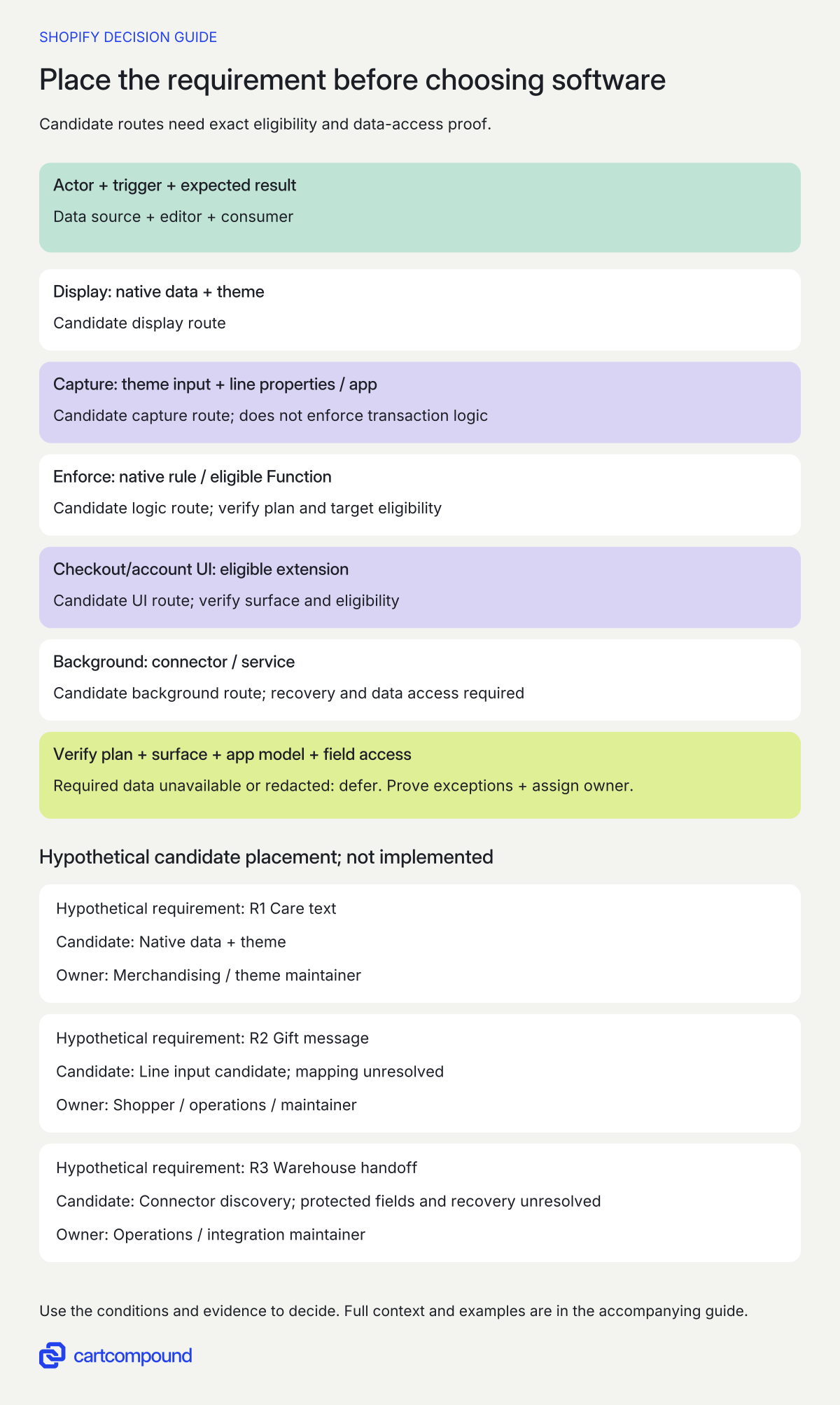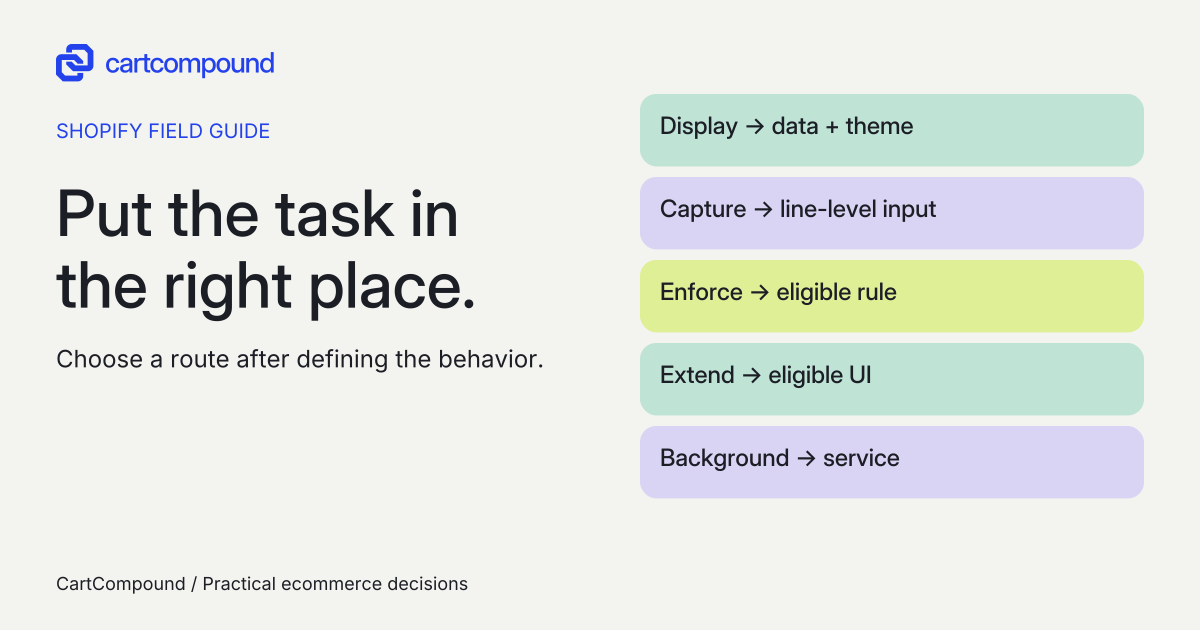
Choose the route after identifying the task, data source and authority. A feature can combine native data, theme input, an app extension and background integration; buying or building an app is not the first decision.
“We need a custom feature” can mean three very different things: show information, collect a shopper input, or enforce a commerce rule. A warehouse handoff adds another need: work must continue after the shopper closes the page.
Break the request into those parts. This guide produces a feature-placement record with the eligible surface, route alternatives, operating responsibilities and acceptance evidence. It lets you compare proposals for the same job.
Put it into practice
Store build decision pack
Turn a store requirement into comparable route evidence, explicit ownership and a cost model you can challenge.
Explore this resourceDefine one requirement that can pass or fail
Use an actor, trigger and result: When a shopper buys two identical totes with different gift messages, fulfillment must see the right message against each tote. Add the exception cases before asking for a route or price.
Separate additional requests into their own records. Product care copy editable by merchandising, a gift message entered by a shopper, an eligibility rule and a warehouse notification do not share the same data owner or execution point.
For each record, write who supplies the value, who may edit it, who consumes it, how long it must remain available, and what happens if it is missing or invalid. Define an observable acceptance case and a failure response. “Works with our warehouse” becomes useful only when the payload, destination field, retry behavior and operator view are specified.
Separate data storage, display and authority
Merchant-maintained product information can belong in native structured data. Shopify documents metafields for extending products and other resources, with care instructions as an example. Metafield documentation. A display component can read that data; it does not follow that every custom content field needs a hosted app.
Shopper input is different. The Ajax Cart API supports line-item properties, and two lines can share a variant ID while differing in properties. Cart API reference. A single order note is therefore a poor proposed destination when the requirement is explicitly per item. You still need to demonstrate that the correct value reaches the order and the actual fulfillment tool.
Transaction authority is a separate question again. If the rule must decide eligibility, pricing or permitted checkout behavior, require an appropriate supported Shopify execution point. A label or browser check can guide a shopper but is not acceptance evidence that every transaction path enforces a rule. Functions provide backend logic targets, subject to their capability and distribution restrictions. Functions overview.
Match the task to its execution surface
First name the actor, trigger, expected result, data source, editor and consumer. Then compare candidate routes:
- Display content. Native data with a supported theme consumer.
- Capture shopper input. Theme input with line properties, or a suitable app.
- Enforce a rule. Native logic or an eligible Function; browser input alone does not enforce it.
- Extend checkout or accounts. An eligible UI extension for the exact surface.
- Continue after the browser closes. A connector or background service with recovery ownership.
Illustrative example Gift text must stay with its tote line. A warehouse export with a missing recipient field goes on hold for controlled correction/retry. Mapping and recovery tests remain to run.
Verify the plan, target, actual app distribution, granted scopes and protected-field access. Required fields unavailable or redacted means defer.
Choose a route on the correct surface
| Job | Candidate surface and route | Decisive check |
|---|---|---|
| Display existing merchant content | Native settings/data plus supported theme controls or bounded theme code. | Can staff edit it and can the theme show its empty/error state? |
| Add app-owned storefront UI | Public app block/embed or a custom theme app extension. | Does the exact page and section support the component? |
| Capture per-item input | Theme input and line properties, or an app when its editing/validation/fulfillment workflow is needed. | Does input remain attached to the intended line through every approved purchase path? |
| Change commerce logic | Native rule first; then a public app or custom app using the relevant Function API if eligible. | Is the exact rule supported and enforced at the required target? |
| Add checkout or account UI | The relevant checkout/customer-account UI extension, provided by an app. | Is that target available on the current plan? |
| Send events to another system | Existing integration/automation, or a server-side custom app/service. | Can it operate without an open browser and recover missed or duplicate work? |
These categories can combine. An app can provide a theme extension for input while its service handles integration. “App” and “extension” are not competing architectural labels: name the installed software, the surface it extends, and any service it depends on.
Shopify documents theme app blocks, embeds and direct code injection, with theme/page/section compatibility limits. Theme app methods. A public app's advertised feature is only a candidate until it passes your requirement and exception cases. A custom proposal needs the same proof.
Verify plan, distribution and version before estimating
For Functions, stores across plans can use App Store public apps containing Functions; custom apps containing Function APIs require Plus, and some capabilities add their own restrictions. Functions availability. Record the exact API target and app distribution, not just “custom discount.”
For UI, information, shipping and payment checkout pages are Plus-only app surfaces. Some thank-you, order-status and customer-account customization apps are available on Basic or higher. Checkout/account app availability. A theme edit cannot substitute for a missing checkout extension target.
For new custom apps, use current creation instructions. Shopify stopped new legacy custom-app creation in admin on January 1, 2026 and directs new creation to Dev Dashboard; existing legacy apps continue. Dated creation change. This does not mean a working old integration should be replaced without a separate reason.
Request the necessary permissions, data categories, API versions, hosting and distribution in the proposal. Challenge permissions that exceed the task. Keep secrets server-side and outside the requirement worksheet. Shopify's versioned API schedule and unversioned surfaces require different upkeep checks. Versioning reference.
Also record the actual app model: an App Store public app, a custom-distribution app, a store-organization Dev Dashboard app, or an existing legacy admin-created app. The distribution table distinguishes public/custom installation scope and says legacy admin-created apps cannot use extensions. App distribution capabilities. Do not apply one model's access or extension rules to another.
Add a protected-data gate for warehouse integrations
Before choosing a warehouse connector, list the minimum fields the warehouse actually needs. Separate order/line identifiers, quantities, SKU and gift text from recipient name and shipping-address components. Add email or phone only if the destination has a documented need. Do not request the whole customer profile by default.
Shopify treats name, address, email and phone as protected fields. Its developer table distinguishes public-app review, custom-app access and plan-dependent admin-created custom-app access; unavailable fields can be redacted or accompanied by GraphQL errors despite HTTP 200. Protected customer data guidance. The Help Center separately says Grow or higher for Custom Level 2 PII apps. Those differently scoped statements do not establish that every new custom app requires Grow or Plus. Resolve the proposed app type and store's eligibility before accepting the route.
Save the actual app ID/type, creation organization, distribution/install route, API/version, requested and granted scopes, required protected fields, approval or eligibility evidence, and a dated representative response check. A vendor saying it has the scope is not proof that the warehouse receives those fields. If a required field is unavailable or redacted, defer that route or agree an alternative workflow; never silently ship with invented values.
Make ownership an operating responsibility
A custom app does not automatically establish who owns its code or can operate it. Put the agreed deliverables, licenses, source access, data export, hosting account, deployment access, documentation and handover responsibilities in the engagement. Record third-party dependencies and what happens if the provider changes.
For a public app, check subscription/usage charges, export format, uninstall effects, vendor support and whether critical data remains accessible. For theme work, record the files or extension involved and the retest needed when the theme changes. For a background service, name a person who can see failed work, reconcile it and contact the destination-system owner.
Separate business acceptance from technical maintenance. Merchandising can own the care wording while a developer owns the display component. Operations can own warehouse exceptions while the integration maintainer owns delivery recovery. “The agency handles it” is too vague for either.
Complete a feature-placement worksheet
Use one row per independently testable requirement. Copy these fields into your project record:
- Task: ID, actor, trigger, expected result and exception cases.
- Data: source, exact minimum field inventory, protected-field classification, editing owner, storage location, consuming system and retention/export requirement.
- Authority: display guidance or enforced rule; named execution surface.
- Eligibility: plan, theme/page/section, actual app type and creation/distribution route, API target/version, requested/granted scopes, protected-field approval or eligibility evidence, and representative returned-field check.
- Alternatives: native evidence, public-app evidence, custom-route evidence and reasons for rejection.
- Operation: recurring dependencies, maintenance owner, failure/recovery behavior and handover deliverables.
- Acceptance: representative case, saved evidence, approving operator and unresolved decision.
A one-time import can be the right route when the job is a finite data transformation. Ask whether any continuing behavior actually remains before adding a permanent app. If the essential capability has no eligible target or verified vendor support, mark it unresolved and investigate before accepting the build scope.
Validate in the order failures become expensive
- Confirm the task and data. Have the consuming operator approve the sample values and expected result.
- Confirm surface eligibility. Verify plan, extension target, theme compatibility, actual app model and access in official/vendor documentation. For protected data, save approval/eligibility and representative field-return evidence.
- Try the smallest feasible route. Check native controls and existing apps against the same cases used for a custom proposal.
- Follow data end to end. Test missing/invalid input, two distinct lines, edits and the relevant cart/checkout paths in an agreed test environment.
- Exercise failure. For integrations, include duplicates, delayed/out-of-order events, destination downtime and missing/redacted required fields. Shopify says webhook ordering and delivery are not guaranteed and recommends reconciliation. Webhook behavior.
- Accept handover. The named operator must find failed work, and the maintainer must have agreed source/access and recovery instructions.
Accept the feature only when the observed behavior, documented limitations and responsible owners match the requirement record. Save failed cases too; they explain why a cheaper-looking route was rejected.
Hypothetical worked example
Worked example: one tote-store request becomes three routes
Hypothetical requirements, not a completed implementation. A fictional tote store wants merchandising to edit product care text, shoppers to add gift messages to individual totes, and approved orders sent to a warehouse. Assume the store uses a Shopify theme; its exact plan, theme version and warehouse connector remain unverified.
| Requirement | Candidate route and data owner | Acceptance/rejection case |
|---|---|---|
| R1: product care text | Native product metafield plus supported theme rendering. Merchandising owns the value; the theme maintainer owns display. | Edit one product without changing another. Empty care content must not leave an empty heading. Reject hard-coded per-product text if staff editing is required. |
| R2: gift text per tote | Theme input with line properties, or a public app if it provides required editing and fulfillment support. Shopper supplies input; operations defines permitted content. | Add the same variant twice with different messages, edit quantity, complete checkout and inspect warehouse output. Reject an order-note-only route because it cannot identify which tote receives which message. |
| R3: approved warehouse handoff | Compare existing connector/automation with a server-side integration. Shopify order data is the source; operations owns release approval; the integration maintainer owns delivery. | Define the approved state and event first. Use the minimum field/access record below. Check synthetic payload mapping, repeated events, destination outage and redacted required fields. Reject browser-only delivery or a connector without an operator-visible hold/recovery route. |
R3: make warehouse data access a decision gate
Additional hypothetical assumptions: this is an outbound export of recently approved orders, not a fulfillment-status writeback or historical migration. The fictional warehouse requires the fields below. Changing that scope requires a new API, permission and destination review.
| Field group | Required for this example | Source/access proof |
|---|---|---|
| Order and line identity | Order ID, line ID, SKU, quantity and approved-release reference. | Exact order query plus the merchant's defined release-state source; no assumption that order creation means approval. |
| Gift text | Per-line message, including two lines with the same variant. | Prove mapping from the captured property to the corresponding warehouse line. |
| Recipient and destination | Recipient name; address line 1; address line 2 when supplied; city; region where required; postal code where required; country code. | Shipping-address fields in the agreed query, actual protected-field eligibility and nonredacted returned values. |
| Contact and other data | No email, phone, billing address or customer-history export assumed. | Add only a documented carrier/warehouse need and its field/access proof. |
The proposed custom candidate is a Partner-created app with custom distribution to one store, using the GraphQL Admin API 2026-10 Order object and read_orders for this recent-order read. The official reference lists that scope and a default 60-day order window; Order access reference. MailingAddress fields provide the schema candidate for the shipping destination. These are proposed choices, not granted access. The record must still contain the real installed app, granted scopes, field eligibility and dated response evidence. A public connector needs its own public-app field approval evidence; an existing admin-created app needs its own plan-dependent check.
Synthetic mapping case, to run later in an agreed non-dispatch environment: provide order TEST-ORDER-01 with lines TEST-LINE-A and TEST-LINE-B, the same TOTE-TEST SKU, quantity one each and messages FOR A/FOR B. Use a synthetic recipient and destination accepted by the warehouse's test interface. Compare the destination payload field by field with the inventory; record the expected line IDs, messages and country/address mapping. This is a test specification, not an executed API call, real address or dispatch.
Then remove or simulate redaction of a required recipient or destination field and include a GraphQL error response case. Expected behavior: place the export on hold, show operations the order reference and missing-field category, avoid logging unnecessary personal data, and permit a controlled retry after access/data correction. Do not dispatch an incomplete address, fabricate a value or mark delivery successful because the HTTP status was 200. Also repeat the same synthetic order and verify it does not create a second warehouse release. Keep R3 unresolved until the data-access and payload evidence exists.
R1 has a documented native-data candidate. R2 has a documented cart-data candidate, but downstream mapping is unresolved. R3 needs the warehouse's fields, acknowledgement behavior, event eligibility and connector evidence. Webhooks are a possible trigger, not a guarantee of complete delivery.
The next scope is therefore a bounded theme/data check for R1, an end-to-end proof for R2, and connector discovery for R3. It is not “build one custom app for everything.” If a public integration meets R3's cases and export/support needs, keep that option. If it fails, use the recorded failure to scope custom work. No route is production-approved by this planning table.
Frequently asked questions
Does a persistent value always require a custom app?
No. Native custom data can hold merchant-maintained resource information such as product care content. Choose storage according to who writes and consumes the value, then verify the display and permissions. Metafields.
Does a custom app mean we own the source code?
Record source deliverables, licenses, rights, access and handover in the engagement. The architectural label alone does not establish those terms.
What needs checking after a theme change?
Recheck app activation, supported page/section placement, custom inputs, cart behavior and downstream data. Shopify notes that theme apps need reactivation after changing the published theme. Theme app guidance.
Sources and further reading
- Metafields
Source checked: October 31, 2026.
- Ajax Cart API reference
Source checked: October 31, 2026.
- Extend your theme with apps
Source checked: October 31, 2026.
- About Shopify Functions
Source checked: October 31, 2026.
- Checkout and customer-account apps
Source checked: October 31, 2026.
- Legacy custom app creation change
Source checked: October 31, 2026.
- About webhooks
Source checked: October 31, 2026.
- Shopify API versioning
Source checked: October 31, 2026.
- Work with protected customer data
Source checked: October 31, 2026.
- About apps: Custom Level 2 PII apps
Source checked: October 31, 2026.
- About app distribution
Source checked: October 31, 2026.
- Order: GraphQL Admin API, 2026-10 displayed
Source checked: October 31, 2026.
- MailingAddress: GraphQL Admin API, 2026-10 displayed
Source checked: October 31, 2026.

About the author
Hamid Khan
Hamid co-founded CartCompound and works with ecommerce founders on their stores and growth priorities.
Profile and guides