Freeze one shopper, storefront channel, variant, quantity and currency. Trace the selected list and any enabled fallback layers, then separate record pricing from later cart adjustments. Compare product, cart and checkout with the same inputs.
A wholesale customer reports a $20 price where you expected $17. Changing the main price list may fix that screenshot while damaging another customer group. First establish which shopper context should select which record and whether the mismatch occurs before or after the item enters the cart.
Use one failing case and one control case. Record the expected price, actual price, actor, storefront, variant, quantity, currency and time. Keep private customer details outside the working sheet. The aim is a price trace that another operator can reproduce, followed by a narrow repair.
Put it into practice
B2B catalog workbook
Specify who may see, buy, quote and approve, then test price precedence at the exact company and location.
Explore this resourceCheck the store’s entitlement and pricing surface
As checked October 31, 2026, the public US BigCommerce comparison uses Core, Growth, Scale and Performance, with Price Lists checked only for Performance. Existing contracts and other regions require separate verification. Check the current pricing table and the store’s agreement instead of automatically renaming an old Enterprise entitlement.
Ask the account owner to confirm that price-list access is provisioned for the affected store and storefront. Keep that evidence with the trace. If the feature is unavailable, choose a supported pricing design or obtain an actual upgrade quote. A developer-documentation endpoint is not proof of purchased entitlement.
Also identify the surface being diagnosed: a storefront, an ERP export, a marketplace listing or a custom app. BigCommerce documents price-list assignments for storefront channels, not a blanket override for marketplaces such as Amazon or Facebook. Do not repair a marketplace feed by assuming storefront price-list behavior applies there. See the Price List API scope.
Freeze the complete shopper context
Copy the failing context into a row before editing anything. Use internal IDs alongside human labels where an authorized operator can retrieve them. A product name is not a variant identifier, and a domain label is not enough to prove the storefront channel.
| Input | Record | Why it matters |
|---|---|---|
| Actor | Guest or synthetic registered buyer; expected group | Distinguishes group pricing from a public price |
| Channel | Storefront name and channel ID | Separates storefront assignments |
| Item | Product, variant ID, options and quantity | Prevents comparing a different SKU or tier |
| Currency | Currency code and transactional or display-only mode | Separates a stored currency price from conversion |
| Assignment | Candidate lists, group/channel scope and active state | Shows the source expected to serve this context |
| Adjustments | Record tiers, product tiers, modifiers, coupons, promotions and tax basis | Separates record selection from final amounts |
| Evidence | Expected/actual by surface, timestamp and update owner | Supports repeat checks and synchronization diagnosis |
Assignments can target a channel, customer group, or their combination; records specify variant and currency. BigCommerce documents these separately. Inspect every applicable assignment rather than guessing which one won. If overlapping assignments leave selection uncertain, preserve the case and have the pricing owner establish the actual selected list in a controlled environment before a broad edit.
Trace the primary list, then only the fallback layers actually enabled
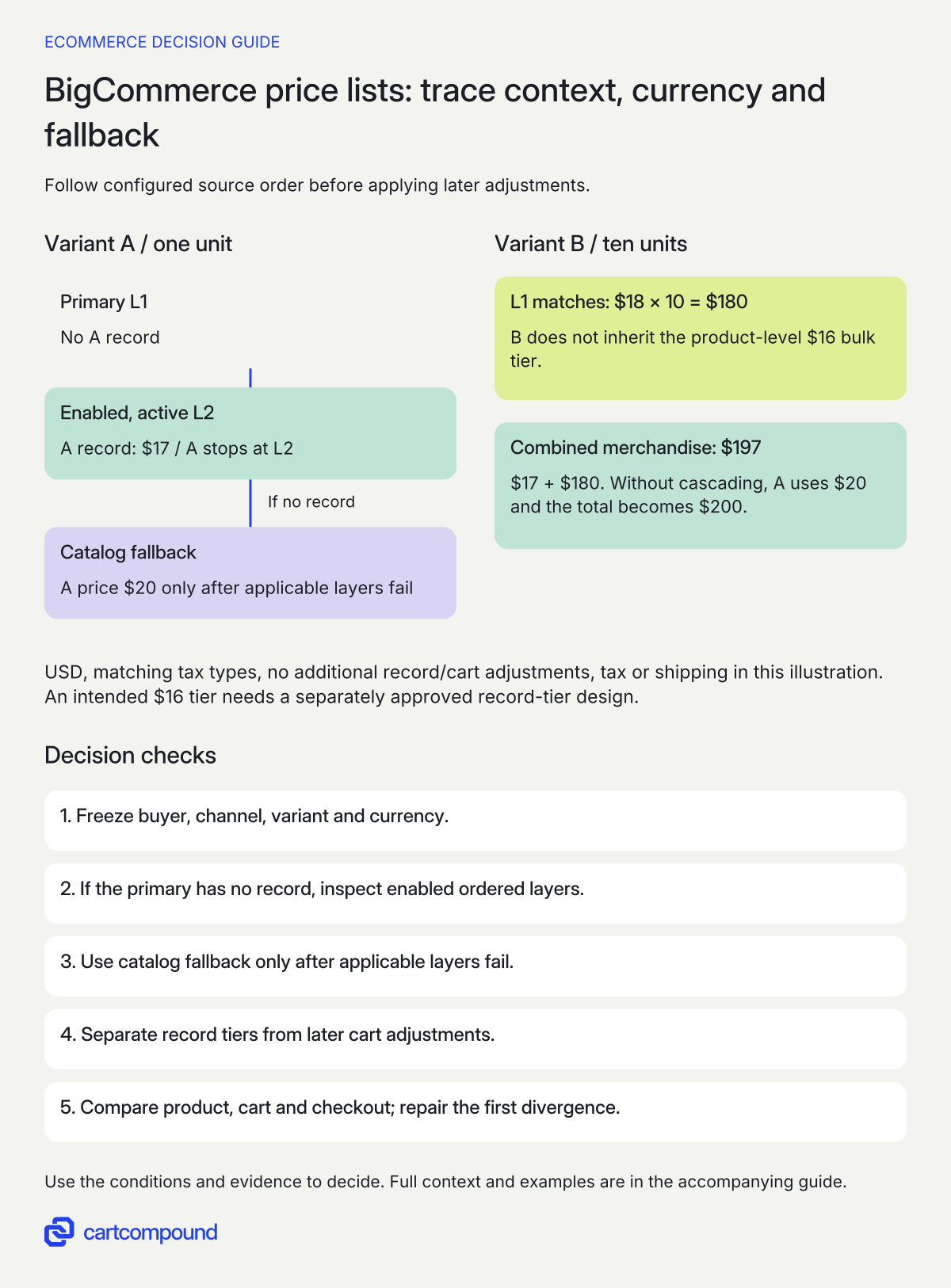
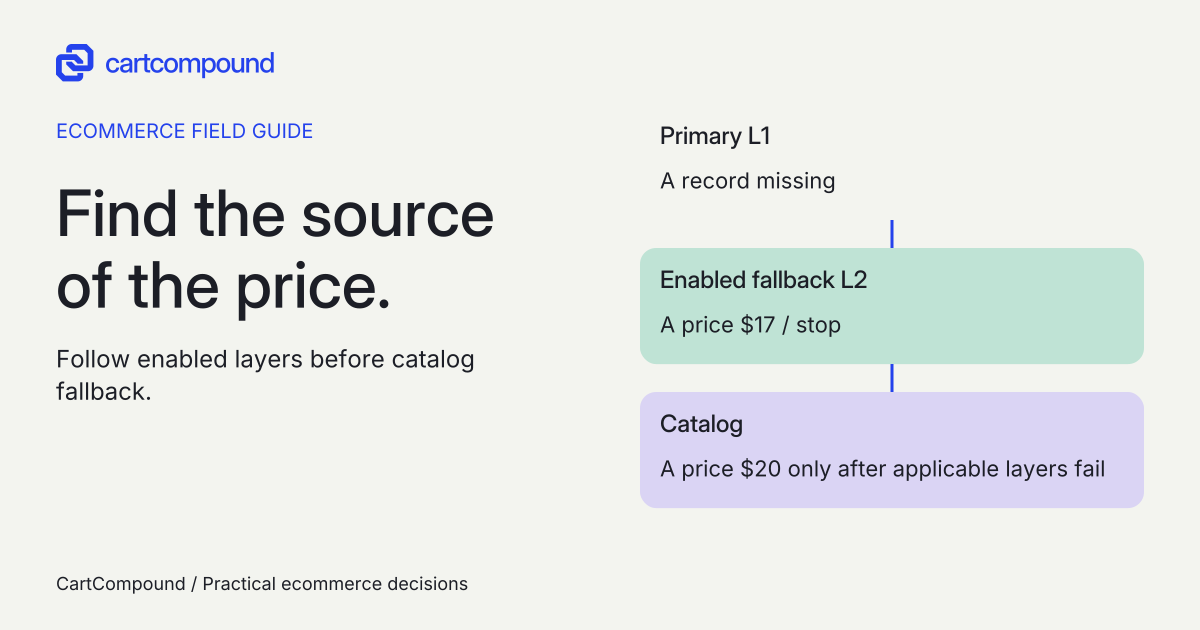
With priority order enabled, current documentation allows up to five ordered fallback layers. Resolution uses the primary list first, then active layers in their configured order, then the catalog. The first available variant record wins. The primary must be active, and layered lists must share the tax type. Read the cascading price-list rules.
Do not assume that cascading is active in every store. Have the pricing owner confirm availability, priority-order state, the primary list and the actual ordered layer IDs. For each layer, record active state and whether the required variant/currency is present. “Fallback list exists” is not enough if it is inactive or never attached to this primary.
If there are no applicable configured layers, use the ordinary missing-record catalog fallback described in the Price List API guide. Keep currency mode explicit: transactional-currency pricing uses that currency’s records, while display-only currency uses conversion. If the relevant multi-currency price list is unavailable, the API guide describes automatic conversion of the catalog price. Do not assume the default-currency contract record is always converted. Record currency coverage and the observed source before treating a missing amount as a deliberate contract price.
The cheapest price is not the rule. If the first active layer with a matching record says $17 and a later layer says $15, the documented ordered model does not search for the lowest amount. The useful question is whether $17 is the intended source for this buyer. Correct the ownership or configuration after proving the mismatch; do not reorder layers simply to make a preferred number appear.
Trace the selected price before changing a discount
- Freeze the context. Keep buyer, channel, variant, quantity and currency unchanged while tracing.
- Inspect enabled ordered layers. A missing primary record can reach an applicable fallback list; catalog fallback comes after those layers fail.
- Separate pricing stages. A list record does not inherit a product-level bulk tier. Check record tiers and later cart adjustments separately.
- Repair the first divergence. Compare product, cart and checkout with identical inputs, then retest quantities and failure cases.
Illustrative example With cascading enabled, A uses active L2 at $17 after L1 misses. B uses L1: 10 × $18 = $180, not the product bulk $16 tier. Combined merchandise subtotal: $197.
Assume USD, matching tax types and no additional adjustments, tax or shipping. Without cascading, A’s $20 catalog fallback changes the subtotal to $200.
Separate record selection from the final cart calculation
Product bulk tiers do not apply to variants with price-list records, and customer-group discounts do not apply to price-list prices. Price-record bulk tiers are a separate mechanism. Modifiers, promotions, coupons and tax can affect the eventual amount. See BigCommerce’s order of operations and record bulk-pricing notes.
This distinction explains a common false diagnosis: the product price is correct, but the operator expected an additional group discount or the catalog’s bulk tier. Identify the exact rule that was expected to apply and whether that rule belongs to catalog pricing or the selected record. Do not copy the catalog discount into the record until the pricing owner approves the resulting commercial terms.
For the first comparison, isolate the case from optional adjustments in a controlled test configuration. Then reintroduce the merchant’s real conditions one at a time: record sale/bulk amounts, option modifiers, promotion eligibility, coupon and tax treatment. Keep quantity and selected options unchanged when comparing product, cart and checkout. A line subtotal, tax-inclusive display and order total are different values, so label the amount being compared.
Also check a mixed basket if the business relies on quantity tiers across variants. Do not infer tier eligibility from the visible item count alone. Ask the owner to record which items qualify under the relevant pricing mechanism and verify the cart result. Preserve any unproven rule as an open acceptance item.
Run a small context matrix before a broad price import
Begin with the failing actor and exact item. Then add controls that change one input at a time. A useful minimum is guest versus wholesale on the affected storefront, wholesale on the second relevant storefront, the same variant in each supported transactional currency, and a second variant with a known record. Add a quantity below and at the relevant tier boundary.
For every row, write the expected record source and expected amount before observing the result. Capture the product selection, cart line and checkout line under the same context. Use synthetic data and your authorized test/release process; do not place a real paid order merely to fill a worksheet. If checkout completion is necessary, agree on the controlled transaction and reconciliation separately.
A row passes only when the expected source, amount and permitted access agree. A public shopper seeing the right retail total does not prove wholesale prices are isolated. Test a disallowed actor as well as an allowed buyer where confidentiality is a requirement. If the UI hides a price but another permitted public surface exposes it, the access requirement remains unresolved.
Save the candidate list/assignment snapshot and the evidence timestamp. That separates a deterministic pricing-rule problem from a source update that arrived between your two observations. Rerun the whole affected context set after a repair, including one previously correct control.
Use the first divergence to choose the repair owner
| Symptom | Evidence to inspect | Repair owner or next step |
|---|---|---|
| One variant falls back unexpectedly | Exact variant/currency record, active primary and ordered layers | Pricing owner fixes missing or incorrectly assigned data |
| Correct group, wrong storefront price | Channel ID and group/channel assignment | Storefront pricing owner resolves assignment context |
| A bulk tier disappears after adding a record | Product-level versus price-record tier | Commercial owner confirms intended record tier |
| Correct source amount, unexpected cart line | Quantity, options, sale/bulk values and later adjustments | Pricing/checkout owner isolates first differing calculation |
| Backend and cart agree; product page is stale | Display data and cache timestamp | Storefront owner investigates presentation freshness |
| ERP says updated but backend record is old | Source event, acknowledged update and destination record | Integration owner reconciles delivery rather than changing price rules |
Price-list changes do not fire product or SKU webhooks; assignment events are separate. Do not build freshness assumptions around a product event that is not emitted. The webhook notes explain this boundary. Have the integration owner document how record updates are acknowledged and reconciled, with source and destination times.
If the correct record never reached BigCommerce, investigate the update path. If it arrived and the wrong record is selected, investigate context. If selection and cart are right but a page is stale, investigate the display path. These observations prevent a pricing import from masking a synchronization incident.
Repair one layer and leave a reconciliation record
Have the responsible owner propose the smallest correction, its affected groups/channels/variants/currencies and the prior values needed for recovery. Obtain the normal commercial approval for changed terms. A technical mismatch does not authorize a new discount or a different negotiated price.
Apply the candidate through the store’s established process, rerun the affected matrix and compare the correct control. Record expected and actual totals, source record, update acknowledgement, date and accepted limitations. If the change crosses an ERP boundary, reconcile both systems before closing it. A one-way update acknowledgment is not proof that the buyer sees the intended amount.
Your next action is to fill one failing row, including the selected list and fallback evidence. If you cannot identify that source yet, keep the price unchanged and scope the diagnosis. Once the source is clear, the repair and its acceptance conditions become much smaller.
Hypothetical worked example
Hypothetical USD test, not a live store result. Assume entitlement is confirmed, the wholesale shopper and channel select active primary L1, priority order is enabled and active L2 is the only configured fallback. Both lists use the same tax type. All amounts are pre-tax merchandise amounts. There are no record bulk/sale adjustments, group discounts, modifiers, promotions, coupons, shipping or tax in the initial calculation.
| Variant and quantity | Catalog | L1 record | L2 record | Expected source and amount |
|---|---|---|---|---|
| A, one unit | $20 | Missing | $17 | L2: $17 |
| B, ten units | $20; product bulk tier $16 at ten | $18 | Irrelevant once L1 matches | L1: 10 × $18 = $180 |
A reaches L2 because L1 has no record. B uses L1 and does not acquire the product-level $16 bulk tier. The combined merchandise subtotal is $17 + $180 = $197. Expecting $177 would wrongly use 10 × $16 = $160 for B, understating the subtotal by $20.
Change one condition: remove cascading from the illustrative configuration while keeping A’s primary record absent. Ordinary catalog fallback makes A $20, so the subtotal becomes $20 + $180 = $200. The $3 difference belongs to A’s source selection, not a coupon.
Now assume the pricing owner explicitly intends a $16 tier for B at ten units. The repair is a separately approved and tested record-tier design, not an assumption that the catalog tier stacks. If the intended record tier is configured and accepted, B’s merchandise line becomes $160 and this illustrative combined subtotal returns to $177. Recheck other quantities and context controls before accepting the change.
Frequently asked questions
Will BigCommerce always choose the cheapest list price?
No such assumption is safe. With documented cascading and priority order enabled, the first matching variant record in the primary or ordered active layers wins. Inspect the actual shopper context and configured order.
Why did the group discount stop applying?
Customer-group discounts do not apply to price-list prices. Check whether the variant now uses a price-list record and have the commercial owner confirm the intended price before adding a different rule.
Do product bulk tiers automatically carry into a price list?
No. A variant with a price-list record does not use product-level bulk pricing. Check the record’s own tier settings and test quantities below and at the boundary.
Can a price-list edit fix a stale ERP integration?
Only if incorrect destination data is the confirmed cause and the proper owner approves the correction. Trace delivery, destination record and displayed price separately. Otherwise the next source synchronization may simply overwrite the manual edit.
Sources and further reading
- BigCommerce Pricing and Plan Information
Source checked: October 31, 2026.
- Price List API
Source checked: October 31, 2026.
- Cascading price lists
Source checked: October 31, 2026.
- Price Order of Operations
Source checked: October 31, 2026.

About the author
Hamid Khan
Hamid co-founded CartCompound and works with ecommerce founders on their stores and growth priorities.
Profile and guides