The short answer
Start with the pages the business needs customers to find. Check access and indexability, then collection discovery, product information and performance. Record each issue with affected URLs, commercial importance, evidence, an owner and an acceptance test. Fix broad access failures before cosmetic metadata changes.
Define the audit around the store you actually operate
A Shopify SEO audit is a comparison between what the business sells, what the website exposes and what search engines understand. A report of warnings is only an input. The useful output is a short queue of changes with clear reasons, scope and checks. Before opening a crawler, identify the markets, languages, active sales channels and collections that matter to the next trading period. A product unpublished from the Online Store should not be treated like a public landing page with an indexing fault.
Ask the trading team for current priorities and stock constraints. Export recent organic landing pages and orders, then identify important collections that receive little traffic. Do not assume existing winners are the only valuable pages. A recently added range may be commercially important without a performance history. Separate branded demand, generic shopping demand and support visits so the audit does not confuse an instruction manual with a category opportunity.
Write an audit boundary: storefront domain, active markets, templates, time period and excluded systems. Note major theme changes, promotions and migrations. This helps explain differences later. Shopify supplies several platform defaults, including generated sitemaps, but their existence does not prove that the current storefront implementation is correct. See Finding and submitting your sitemap for the platform's sitemap behavior.
Build a representative evidence set
Inspect examples from each meaningful template rather than drawing conclusions from the homepage alone. Include a high-selling product, a new product, a product with several variants, a temporarily unavailable item, a major collection, a paginated collection and a guide. Add localized examples when the store serves distinct markets. Record the exact URL, response, canonical, robots directives, sitemap presence and links pointing to it.
Compare an export of intended public URLs with a crawl from the homepage and with Search Console. Each dataset answers a different question. The export describes intent; the crawl shows what links expose; Search Console describes Google's recorded processing. A URL present in one and absent in another is a lead to investigate, not automatic proof of failure. A canonical duplicate can be correctly excluded while its preferred page remains indexed.
Capture screenshots or exported evidence for representative faults. Record when the evidence was collected and which theme was live. A statement such as 'product pages have broken schema' is too broad unless the sample demonstrates a template-wide condition. Write 'three sampled bundle products output two conflicting offer prices' and expand the sample before proposing a global change. Keep customer data and private admin URLs out of the shared report.
 Keep this framework
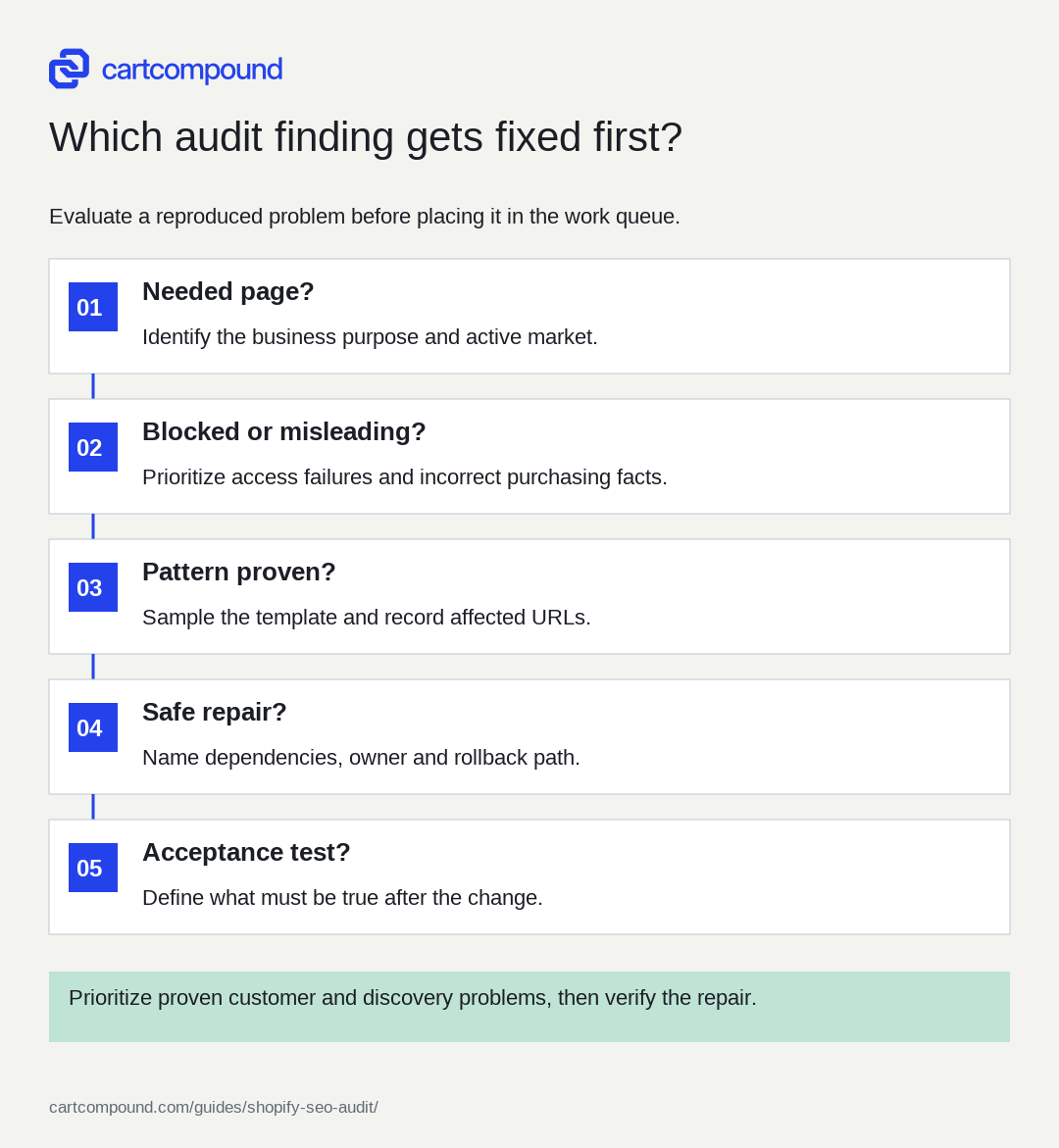
Which audit finding gets fixed first?
Evaluate a reproduced problem before placing it in the work queue.
- Needed page?Identify the business purpose and active market.
- Blocked or misleading?Prioritize access failures and incorrect purchasing facts.
- Pattern proven?Sample the template and record affected URLs.
- Safe repair?Name dependencies, owner and rollback path.
- Acceptance test?Define what must be true after the change.
Prioritize proven customer and discovery problems, then verify the repair.
Use the steps with your store data. Examples in this guide are illustrative unless a source is named.
Check access, indexing and canonical selection first
Confirm that priority pages load publicly, return the intended status and show the product or collection without authentication. Check for accidental noindex directives, password protection, redirects to unrelated pages and blocked essential resources. Inspect the rendered page when the raw response and visible storefront differ. A product grid that appears only after an interaction deserves special attention because discovery should not rely on a crawler using a filter or search box.
Use Search Console's URL Inspection tool on representative pages, comparing the declared canonical with Google's selected canonical where available. The indexed result describes a previous crawl; a live test examines current accessibility and is not a promise of indexing. See URL Inspection tool. If a recent repair appears successful in the live test while the index report still shows the old state, record both dates rather than repeating the edit.
Do not try to make the total excluded-URL count zero. Redirects, duplicates and intentionally unavailable pages can be excluded correctly. Investigate the intersection between exclusion reasons and pages that should attract shoppers. Google's Page indexing report explains these distinctions. A small group of valuable collections blocked by a template change can deserve more attention than thousands of harmless parameter URLs.
Test the journey from collection to product
Move through the site as a shopper and inspect the corresponding links. Can someone reach the important collection from a sensible parent page? Can they reach products beyond the first grid? Are filters understandable and reversible? Do product cards show the right item, price and availability? These checks connect SEO discovery with the shopping experience instead of treating them as separate inventories.
Look for products that appear in the sitemap but have no useful incoming navigation links. Find collection links that lead through redirects, empty categories that still occupy prominent menus and editorial guides that recommend discontinued items. Google recommends a linked hierarchy that connects categories and products; see Help Google understand your ecommerce site structure. That principle does not mean every product belongs in the main menu. It means the site offers a coherent, crawlable path.
Evaluate category intent against the assortment. A collection named for waterproof trail shoes should not rely on generic running products that fail the stated requirement. Check whether product attributes support filters and whether the buying guidance explains real differences. Avoid prescribing a fixed paragraph length for every collection. Some need a short definition and clear filters; others need compatibility or sizing help that should be visible before a customer makes a choice.
Reconcile product facts and structured information
For selected products, compare the visible page, chosen variant, cart and any Merchant Center data source. Record title, image, SKU or identifier, currency, active price, sale conditions and stock state. The biggest problem may be disagreement between systems rather than a missing keyword. A page advertising an unavailable size as purchasable creates a direct customer problem even if every title tag looks polished.
Run a rich-result validation on the actual product URL. Inspect the underlying output when several apps or the theme produce overlapping Product markup. Multiple blocks are not automatically wrong, but contradictory offers for the same item need an owner. Separate required errors from recommended-property warnings. Add a property only when the store can support it with accurate data. Google's Merchant listing structured data documents the relevant merchant offer information and eligibility requirements.
Check titles and descriptions as promises about the landing page. Look for duplicated templates that obscure the actual item, missing differentiators, obsolete promotional claims and truncation in the interface. Do not rewrite every page merely to achieve a character count. A more useful specification states what the shopper needs to recognize, what changes by product and how the team will keep it current when the catalog changes.
Diagnose performance and mobile friction in context
Review real-user performance by template and device, then use a controlled lab test to locate the likely cause. A strong homepage score does not clear a slow product template with reviews, subscriptions and variant widgets. Conversely, a single poor lab run should not trigger wholesale app removal without checking whether the delay represents actual shopper experiences. Keep the device, connection, page state and consent state consistent when comparing tests.
Check loading, interaction and visual stability separately. A large hero image can delay the main content; an expensive script can delay a variant change; a late-loading banner can move the purchase button. These problems require different fixes. Shopify's Web performance reports describes its reports and how storefront changes can be compared with performance data.
Finish the mobile pass by completing a realistic purchase path. Test menu expansion, filtering, variant selection, delivery information and cart updates. Capture the failure and the state that produces it. 'Mobile is slow' is hard to implement. 'On the sampled product, selecting a second size stalls while the review widget initializes' provides a reproducible starting point. Check accessibility and readability alongside speed so a performance change does not remove essential buying information.
Turn findings into an implementable priority table
Use three judgments: business exposure, evidence strength and implementation risk. Exposure considers affected valuable pages and the severity of the problem. Evidence strength distinguishes a reproduced defect from a hypothesis. Risk considers dependencies, reversibility and the chance of breaking purchase or tracking behavior. Do not multiply arbitrary scores and present the result as measured lost revenue.
On a small screen, swipe the table to see every column.
| Illustrative finding | First action | Acceptance test |
|---|---|---|
| Priority collection accidentally noindexed | Correct the specific template condition | Public 200 response and no unintended noindex |
| Later grid products lack links | Repair the pagination path | Products discoverable through normal links |
| Variant price differs from feed | Reconcile the source and refresh path | Same variant agrees across page, cart and feed |
| Generic descriptions on low-demand items | Improve a relevant product group | Useful factual distinctions with approved data |
For example, an illustrative store finds an access failure affecting eight commercially important collections and short descriptions on 300 accessories. The access failure goes first because it prevents discovery of a core range. The descriptions become a scoped content project after checking the questions shoppers actually need answered. The product count alone does not determine priority. Assign one accountable owner, dependencies and a review date to each accepted issue.
Verify repairs and establish the next audit trigger
Retest the exact failing examples plus neighboring cases after a repair. A collection canonical fix should be checked on the first page, later pages, filtered states and localized versions. A product-data repair should cover several variant and sale states. Confirm that a crawler sees the expected change and that the storefront still supports the shopping task. Store the before-and-after evidence with the change record.
Measure immediate implementation outcomes separately from delayed search outcomes. Successful deployment means the defect is corrected. Later indexing, impressions and orders help assess what happened after discovery and recrawling, but changes in demand, stock and promotions still matter. Use annotations and a comparable time window. Do not claim all subsequent organic growth as the audit's effect.
The next useful action is to create a one-page audit queue containing the three strongest findings, their evidence and their acceptance tests. Then establish triggers for another focused pass: theme release, catalog import, market launch, search app change or unusual indexing shift. A maintained record of known decisions prevents the same harmless exclusions from being rediscovered as emergencies every month.
Your action checklist
Use this to decide what to do next. Your checks stay on this page and are not sent or saved.
0 of 6 checked
Common questions
How often should a Shopify SEO audit happen?
Use major changes and observed problems as triggers. A routine sample review can catch drift, while a migration or new market needs a dedicated pass before and after launch.
Do I need a paid crawler?
A small store can begin with exports, Search Console and manual samples. A crawler becomes useful when template patterns and link relationships are too numerous to inspect reliably by hand.
Can the audit estimate sales lost to each error?
Usually only as a scenario with explicit assumptions. An access defect can be proven directly; revenue that would have occurred without it cannot be read from a warning count.
Sources and review
Source documentation checked October 27, 2026. Platform features and interfaces can change. The recommendations and illustrative examples explain how to make the decision; they do not promise results.
- Finding and submitting your sitemap
Shopify generated sitemaps and submitting them through Search Console. - URL Inspection tool
Indexed data versus live tests, canonical inspection and indexing requests. - Page indexing report
Indexing exclusion reasons and expected versus unexpected exclusions. - Help Google understand your ecommerce site structure
Crawlable hierarchy and links connecting category and product pages. - Merchant listing structured data
Product offers, current price, currency, availability and merchant eligibility. - Web performance reports
Shopify real-user performance reports, device segments and report timing.
Talk through your store question
Bring one problem you want to solve.
A free 20-minute call with Hamid can help you decide what to investigate next.
Book a free 20-minute call
About the author
Hamid Khan
Hamid co-founded CartCompound and works with ecommerce founders on their stores and growth priorities.
Profile and guides