The short answer
Identify the exact URL that should be indexed, then inspect its recorded status and current live accessibility. Check response, robots directives, canonical target, publication and internal links. Treat duplicates and intentional removals as expected exclusions. Fix the underlying cause before requesting recrawling, and do not treat a successful request as guaranteed indexing.
Define the URL that actually needs to appear
An indexing report can contain product pages, duplicate paths, filters, redirects and removed URLs. Their exclusion is not equally important. Start with the exact preferred URL and the customer task it should serve. Confirm the product or collection is intended to be public in the relevant market and is published to the appropriate channel.
Google's Page indexing report explains that not every known URL needs indexing. Duplicate pages, intended redirects and unavailable content can be excluded correctly. A report with many exclusions is not automatically an emergency. The more useful question is whether a valuable, intended canonical page is absent and whether the stated reason matches the store's intent.
Create a diagnosis sheet: URL, purpose, preferred canonical, first observed problem, last site change, current public response, recorded status and owner. Include the date of Google's reported crawl where available. This prevents the team from repeatedly fixing an old report entry that no longer describes the live page, or overlooking a fresh defect because a historical report still looks healthy.
Read indexed information and live tests separately
Search Console's URL Inspection tool provides recorded indexing information and a live-test capability. They answer different questions. The recorded result can show what Google last processed, including canonical information. A live test checks current accessibility and aspects of indexability but does not guarantee that the page will be indexed or determine every canonical condition.
Use URL Inspection tool as the primary reference for interpreting those views. Capture the selected canonical, crawl timing and stated exclusion reason before running the live test. Then compare the current response and rendered content. If the page changed after the recorded crawl, document that sequence before making further edits.
Do not rely only on a site search or a manual search for a product name. Search presentation varies, and a page can be indexed without appearing for the query you expect. Conversely, a remembered result can point to a different canonical. Use the exact URL and report evidence to diagnose indexing, then assess query relevance and ranking as separate questions.
 Keep this framework
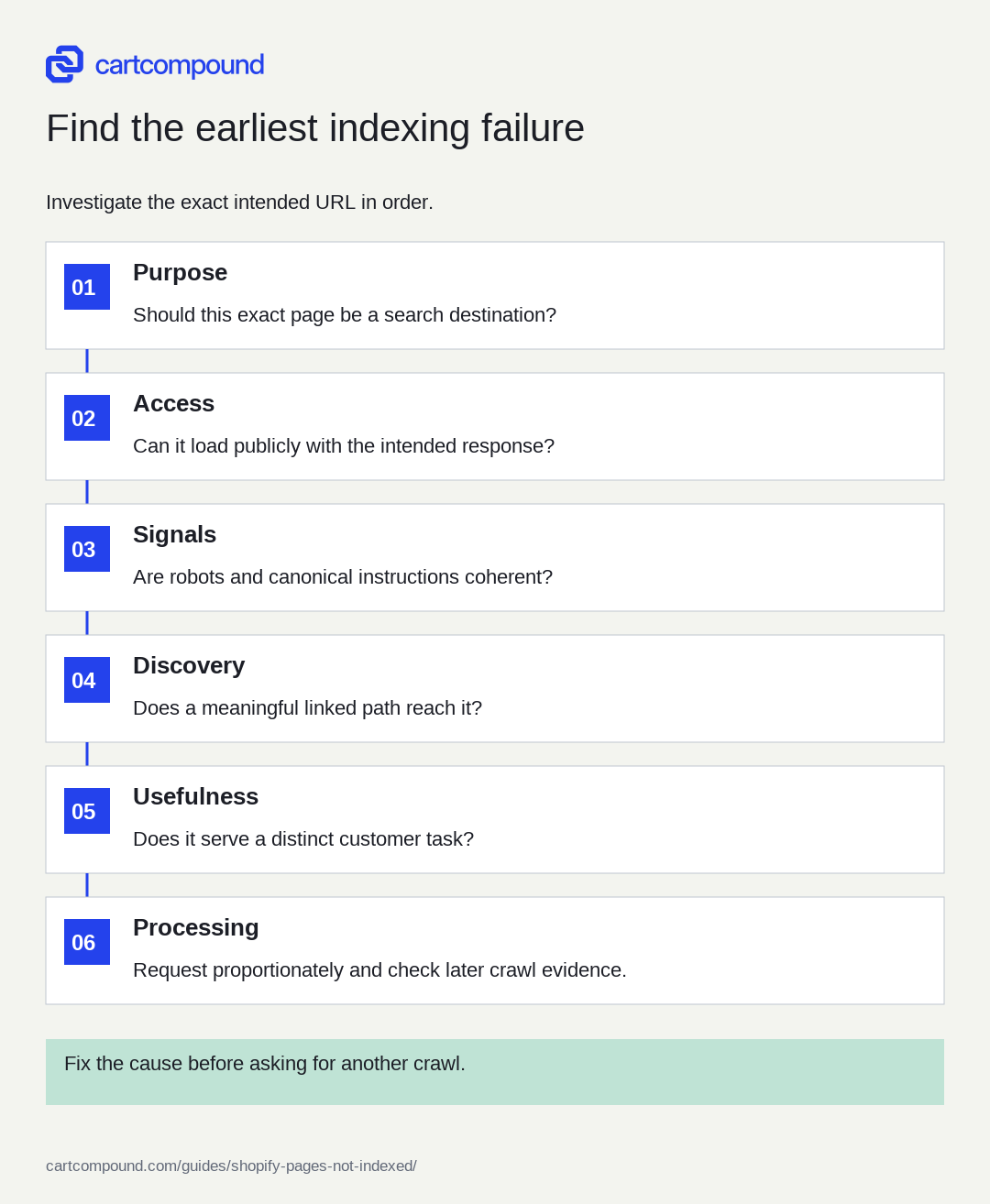
Find the earliest indexing failure
Investigate the exact intended URL in order.
- PurposeShould this exact page be a search destination?
- AccessCan it load publicly with the intended response?
- SignalsAre robots and canonical instructions coherent?
- DiscoveryDoes a meaningful linked path reach it?
- UsefulnessDoes it serve a distinct customer task?
- ProcessingRequest proportionately and check later crawl evidence.
Fix the cause before asking for another crawl.
Use the steps with your store data. Examples in this guide are illustrative unless a source is named.
Check access and publication before content theories
Open the URL publicly in a fresh session. Confirm that it does not require a password or account, return an error or redirect to an unintended page. Verify product publication and market availability. Inspect relevant robots rules, noindex directives and essential blocked resources. A visible browser page is not enough if a crawler receives a materially different response or cannot access the content.
Compare source and rendered content when scripts are important. Make sure the product or collection actually appears, with meaningful information and normal links. A page that loads a shell but fails to populate products can look like a successful request while giving search systems little to process. Investigate application errors and data failures before rewriting descriptions.
Check template scope. If all pages of one type are affected, look for shared conditions introduced by a theme, SEO app or migration. If only a few are affected, compare their publication state, stock, redirects and content with a healthy example. A reproduced technical pattern is stronger evidence than a generic claim that the site needs more authority.
Interpret common reasons according to the page's purpose
The report's reason guides the next investigation, but it is not always the root cause by itself. Treat a canonical duplicate differently from a blocked primary collection. Google's page-indexing documentation defines the reasons and their limits. Keep the affected URL's intended role beside the report label.
On a small screen, swipe the table to see every column.
| Recorded reason or condition | Useful next question | First evidence |
|---|---|---|
| Redirect | Is the final destination the intended page? | Exact redirect path and target status |
| Alternate or duplicate | Is the preferred representative correct? | Declared and Google-selected canonicals |
| Noindex or robots restriction | Is the exclusion intentional? | Live directive and matched rule |
| Discovered, not indexed | Is the page accessible and meaningfully linked? | Publication, links and crawl evidence |
| Crawled, not indexed | Does this page deserve a distinct destination? | Rendered content, duplication and usefulness |
Avoid a universal 'request indexing' response to every row. The request cannot make an intentionally redirected URL become the representative page, repair a noindex directive or create useful content. Choose a response that addresses the actual condition.
Investigate unexpected canonical selection
Inspect both the missing URL and the page Google selected as representative. Compare content, status, canonical declarations, redirects, sitemap entries and internal links. An unexpected target may come from a theme error, duplicate product paths, a migration artifact or very similar pages with inconsistent signals.
Google's Fix canonicalization issues provides a troubleshooting process for mismatches. Determine whether Google's selection is actually more sensible for users before forcing a different preference. If two pages serve the same need, consolidation may be appropriate. If a localized or genuinely distinct page is being collapsed, fix the content and signal conflict that obscures its role.
Do not point a canonical at an inaccessible or unrelated destination and expect the annotation to solve indexing. Check the final response and public content. Keep a representative sample across product, collection, pagination and market patterns because a global canonical repair can accidentally damage a different template. A canonical is a signal within a larger system, not an override switch.
Improve discovery and distinct usefulness
A page can be technically eligible while having weak discovery or little reason to stand independently. Trace its incoming links from a sensible category or relevant guide. Google recommends a linked ecommerce hierarchy in Help Google understand your ecommerce site structure. A sitemap helps, but should not be the only route to commercially important products.
Compare the page with nearby alternatives. Does it contain a distinct product, a useful assortment or information that helps a customer decide? A collection with no meaningful selection, a duplicate product created for a minor phrase variation or a guide that repeats manufacturer copy may not need a separate indexed destination. Improve the actual task or consolidate where appropriate.
For an illustrative store, five collections show the same ten products with almost identical descriptions and slightly different headings. The solution may be one maintained category and useful filters, rather than submitting five indexing requests. Another store has a unique new compatible part with accurate specifications but no incoming category link. That calls for a discovery repair. Similar report labels can conceal different underlying decisions.
Fix the cause and request processing proportionately
Make the smallest change supported by the diagnosis. Retest live responses, directives, canonical targets and rendered content. For a few important repaired pages, use the appropriate indexing-request option. For larger groups, maintain correct sitemaps and internal discovery rather than repeatedly submitting individual addresses. Shopify's Finding and submitting your sitemap explains its generated sitemap and submission process.
Save before-and-after evidence and the repair date. If the report still reflects an earlier crawl, avoid making another unrelated change merely to provoke an update. Recheck whether the page has been revisited and whether the intended canonical is recorded. Requests and sitemaps assist processing; neither promises an indexing date or search placement.
Do not buy or generate arbitrary pages and links solely because a URL remains excluded. First resolve the evidence available on the store. If a technically healthy, useful page remains absent, document the uncertainty, monitor the relevant group and continue improving the customer purpose. Search systems do not provide a guaranteed recipe for every indexing decision.
Sequence robots and noindex repairs carefully
If a needed page is blocked from crawling and also contains an unintended noindex directive, removing only one condition leaves the other problem in place. Inspect the actual response and matched crawl rule together. Confirm that the intended page becomes both accessible and eligible after the repair, rather than treating a successful robots test as the entire diagnosis.
The reverse situation also matters. If a utility page should be excluded with noindex, a crawler generally needs access to read that directive. Adding a crawl block at the same time can prevent the new instruction from being processed. Choose the transition according to the actual goal and recorded state, and avoid applying one emergency rule to both valuable products and disposable utility URLs.
Use three representative cases in a repair test: a public product that must remain eligible, a canonical duplicate that should resolve to its representative and a utility page intentionally excluded. Record expected access and index treatment separately for each. That small matrix catches broad rule mistakes before they affect a larger catalog. After release, check current output first, then the later recorded crawl state. The order prevents repeated changes driven by a report that has not yet processed the corrected implementation.
Track priority coverage instead of chasing a perfect report
Maintain a small set of important intended canonical URLs by template, market and commercial role. Track whether they are accessible, linked, represented correctly and indexed where expected. Record intentional exclusions and retirements so future audits do not reopen settled decisions. This produces a more meaningful coverage picture than the ratio of all known URLs.
Monitor new theme releases, catalog imports, market changes and app updates as likely triggers. A sudden template-wide shift deserves prompt investigation. A few long-known duplicate parameter URLs appearing in the report may simply reflect continued discovery. Keep severity tied to current customer and business impact.
The next action is to select three missing priority pages with different report reasons and complete the diagnosis sheet for each. Compare live and recorded evidence, identify the earliest failing stage and correct that stage. Then verify the exact examples and neighboring patterns. A disciplined process turns a vague 'Google is not indexing Shopify' complaint into a set of specific, testable decisions.
Your action checklist
Use this to decide what to do next. Your checks stay on this page and are not sent or saved.
0 of 6 checked
Common questions
Does Crawled, currently not indexed always mean a technical error?
No. Google retrieved the page but did not index it at that point. Review distinct usefulness, duplication, canonical relationships and current evidence instead of assuming a broken server.
How quickly will an indexing request work?
There is no guaranteed timing or outcome. Fix the underlying cause, submit proportionately and review later crawl evidence rather than repeatedly changing the page.
Should I make every excluded URL indexable?
No. Redirects, duplicates and intentionally removed or utility pages can be excluded correctly. Focus on valuable intended canonical pages and unexpected reasons.
Sources and review
Source documentation checked October 27, 2026. Platform features and interfaces can change. The recommendations and illustrative examples explain how to make the decision; they do not promise results.
- Page indexing report
Indexing exclusion reasons and expected versus unexpected exclusions. - URL Inspection tool
Indexed data versus live tests, canonical inspection and indexing requests. - Fix canonicalization issues
Compare Google-selected canonicals with declared signals and content. - Help Google understand your ecommerce site structure
Crawlable hierarchy and links connecting category and product pages. - Finding and submitting your sitemap
Shopify generated sitemaps and submitting them through Search Console.
Talk through your store question
Bring one problem you want to solve.
A free 20-minute call with Hamid can help you decide what to investigate next.
Book a free 20-minute call
About the author
Hamid Khan
Hamid co-founded CartCompound and works with ecommerce founders on their stores and growth priorities.
Profile and guides