The short answer
Map each duplicate URL to its intended purpose and preferred page. Inspect live canonical output, internal links, sitemaps and Google-selected canonicals. Consolidate genuine duplicates while preserving useful variant selection and distinct regional pages. A canonical is a signal, so verify what Google records after recrawling.
Define the problem before trying to remove duplicates
Duplicate content can mean several different things: one product accessible through multiple paths, a parameter selecting a variant, two separate products with nearly identical descriptions, or translated storefront pages that look similar. These cases do not call for one universal fix. Start by identifying the object and the customer task represented by each URL. A different address does not automatically mean the store has created another page that should compete in search.
Google explains that canonicalization selects a representative page from duplicate or very similar pages. Its How to specify a canonical URL documents redirects, canonical annotations and sitemap signals. These mechanisms express a preference; they do not guarantee that Google chooses the specified address. The goal is coherent signals around the right destination, not the elimination of every alternate URL that shoppers or systems use.
Build a worksheet with duplicate URL, preferred URL, reason the alternate exists, visible difference, current canonical, internal links and Google-selected canonical. Keep URL duplication separate from weak product descriptions. Consolidating addresses does not make a sparse product page more useful. Similarly, rewriting descriptions will not repair a theme that sends every collection to the wrong canonical address.
Inspect collection-path product URLs as a pattern
Some Shopify theme implementations expose a product through a collection path as well as its direct product path. Open both versions for the same item and compare the response, content and canonical. Do not assume a theme behaves a particular way because another store does. Apps, theme edits and older customizations can change the generated output.
An illustrative pair is /products/linen-shirt and /collections/summer/products/linen-shirt. If both show the same item and the direct product URL is the intended representative, review product-card links, recommendations, breadcrumbs and editorial links for consistency. The collection context may still serve the customer, but it should not accidentally create contradictory canonical signals or a dependency on a less useful address.
Check whether the alternative is actually indexed instead of treating its presence in a crawl as proof of harm. If Google correctly selects the intended page, the immediate task may be reducing unnecessary URL variation and documenting the pattern. If it selects an unexpected page, inspect stronger conflicts first: redirects, a wrong canonical target, a target that fails to load or major differences in content. Keep evidence of both the public response and Google's recorded selection.
 Keep this framework
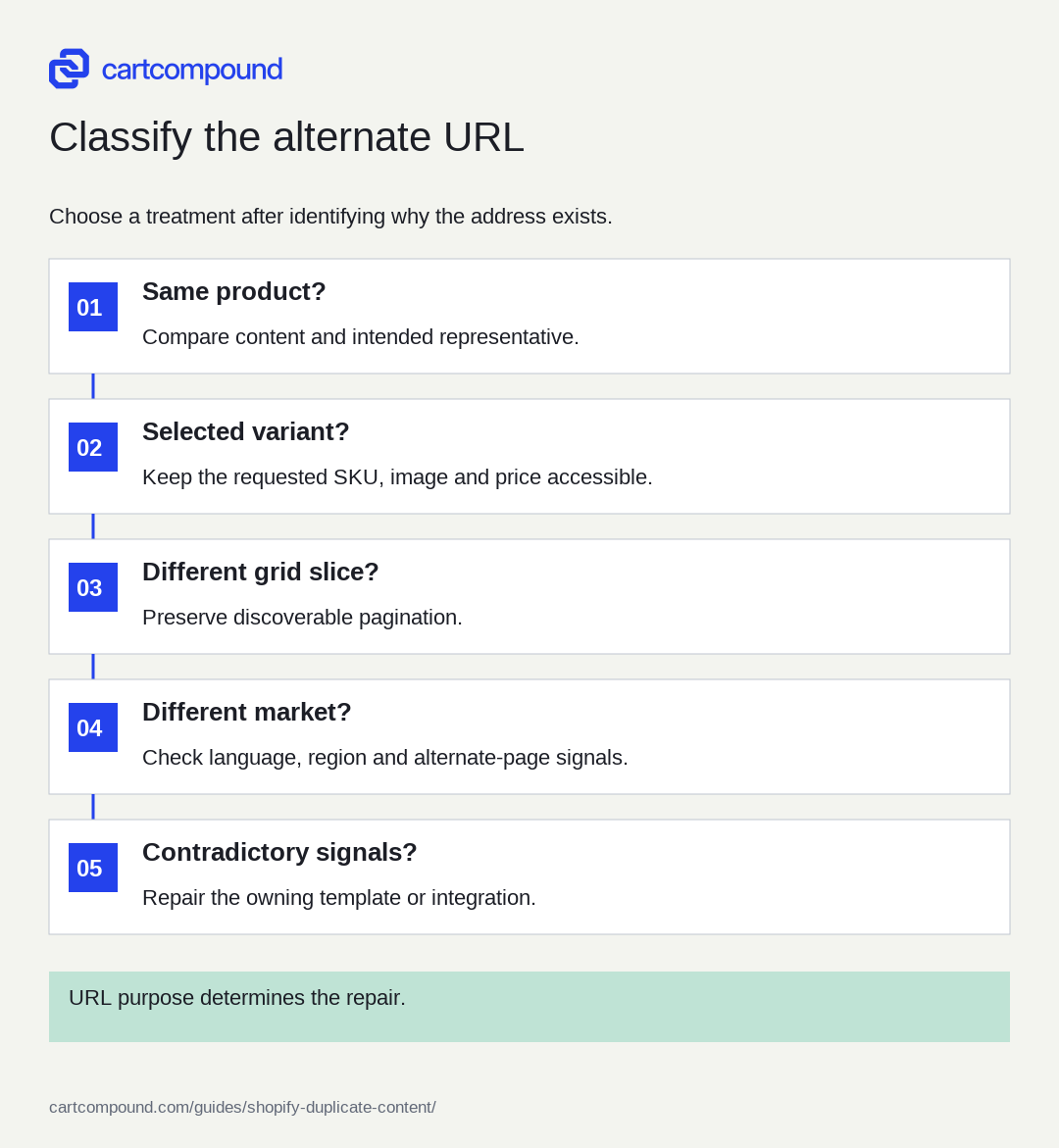
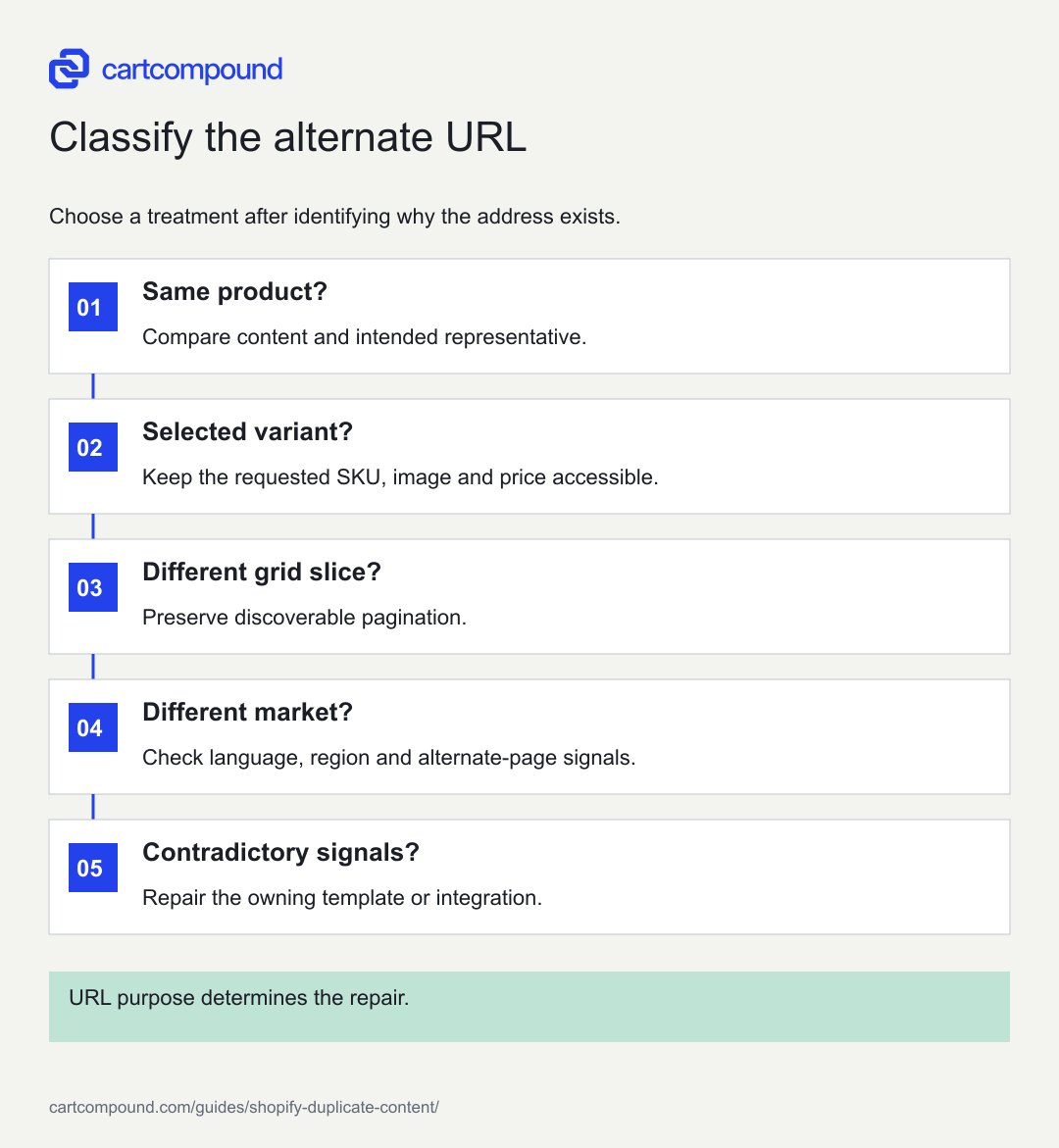
Classify the alternate URL
Choose a treatment after identifying why the address exists.
- Same product?Compare content and intended representative.
- Selected variant?Keep the requested SKU, image and price accessible.
- Different grid slice?Preserve discoverable pagination.
- Different market?Check language, region and alternate-page signals.
- Contradictory signals?Repair the owning template or integration.
URL purpose determines the repair.
Use the steps with your store data. Examples in this guide are illustrative unless a source is named.
Handle variant URLs according to the page model
A variant URL often exists so a customer can arrive with a particular size, color or configuration selected. That is a useful function. Deleting variant parameters from every link can break product-feed destinations or send a shopper to the wrong offer. First test what the URL does on a clean visit, before cookies or prior selection influence the page.
For a single-page variant model, an illustrative ?variant=123 URL may preselect the navy medium shirt while the base page represents the family. For a genuinely separate product or multipage variant architecture, each page can have a different role. Google's Product variant structured data distinguishes single-page and multipage designs. Choose the architecture around the real product relationship, then align selection, content and markup.
Use a variant test record: requested variant, displayed image, price, availability, cart line item and canonical. A correct canonical does not excuse an incorrect selected SKU. Equally, a functioning selector does not prove canonical consistency. Test unavailable options, a default option and a second available variant. Preserve campaign parameters where needed for measurement while ensuring they do not redefine the intended primary product page.
Distinguish duplicate utility states from useful collections
Collection filters, tags, sorting and pagination produce different kinds of URLs. A sort parameter may reorder the same inventory. A filter may expose a meaningful subrange or an arbitrary combination. Page two contains a different slice of the collection. Classify these before adding a global canonical rule, because sending all states to the unfiltered first page can erase distinctions the site needs.
For a normal paginated collection, Google recommends distinct URLs for pages in the sequence; see Pagination and incremental page loading. Do not use a blanket 'remove every query parameter' canonical rule if it collapses later pages incorrectly. A curated collection with a distinct shopping task also deserves a separate evaluation from a temporary filter state.
On a small screen, swipe the table to see every column.
| URL pattern | Question to answer | Likely work |
|---|---|---|
| Collection-path product | Same product and content? | Align preferred address and links |
| Variant parameter | Does it select a purchasable configuration? | Preserve selection and align page model |
| Sort parameter | Same inventory in a different order? | Choose duplicate-state controls |
| Pagination | Different products on later pages? | Keep a coherent discovery sequence |
| Curated narrow collection | Distinct shopping purpose? | Review as a possible landing page |
Find the source of conflicting canonical output
Inspect the page source and rendered document for canonical declarations. Record the full target, including protocol, host, path and meaningful parameters. Check whether a theme and SEO app both generate a tag, whether client-side code changes the target and whether the destination responds successfully. Multiple identical declarations may be redundant; conflicting declarations make the intended preference unclear.
A common implementation mistake is building the target from the wrong template variable or store domain. A global expression can accidentally point every page to the homepage, an old domain or a default locale. Test product, collection, article and market templates rather than fixing the first example in isolation. Review Google's Fix canonicalization issues when the selected representative differs from the one declared.
Identify the owning system before editing code. If an app manages the declaration, a theme patch can create another conflict rather than solve it. Record the current configuration, make the smallest scoped repair and preserve a rollback path. Use a preview or staging workflow where available. Acceptance means one coherent preferred target for the affected pattern and no regression in variant selection, pagination, market routing or product-feed links.
Preserve language and market distinctions
Localized pages can have similar product photographs and descriptions while serving different audiences, currencies or fulfillment terms. Do not consolidate all market pages to the primary storefront just because the product is the same. First establish the intended market architecture and which regional URLs should stand independently.
Shopify's International SEO for markets describes automatic market-related canonical, hreflang and sitemap behavior when the relevant domain and language setup exists. Inspect the actual output because custom apps and theme changes can introduce duplicate systems. A page meant for French shoppers should not casually point to an English product as its representative merely to reduce duplicate counts.
Build a small language matrix for one product: market URL, visible language, currency, canonical and alternate references. Include a product unavailable in one market. Confirm that links lead to equivalent destinations rather than every localized product pointing to a regional homepage. If the store uses the same URL for all markets, document that limitation instead of inventing distinct alternate addresses. Localization decisions belong with the market and merchandising owners as well as the SEO implementer.
Use redirects and crawl controls for the right reasons
A permanent redirect is appropriate when an old destination has truly moved to a relevant replacement. It is less appropriate when the alternate URL still needs to select a variant or retain a useful browsing state. Review the customer consequence before consolidating. A redirect that removes the selected size can break the buying journey even if the final address looks tidier.
Do not use robots blocking as a substitute for canonical evaluation. A crawler needs access to read page-level signals, and blocking a URL does not itself establish another canonical. Likewise, adding noindex to genuine duplicate product paths is not the same as communicating which page should represent them. Google's canonical guidance recommends canonical annotations for that duplicate-page purpose. Filter crawl control is a separate design decision that needs its own plan.
Write the intended transition explicitly. For example: 'Keep existing variant URLs functional; make internal generic product links use the base address; retain canonical output from the approved theme component; validate feed links against selected variants.' This is more useful than a task labeled 'fix duplicate content.' It also lets reviewers identify whether the proposed change affects shoppers, tracking or integrations beyond search.
Verify the repair using old and new evidence
After implementation, retest the original duplicate and target, then sample neighboring products and template states. Confirm status codes, canonical output, visible content, selected variants, internal links and sitemap destinations. Crawl from navigation as well as visiting known URLs directly so the test catches links that still generate the old pattern.
Use Search Console to compare Google's recorded canonical after the relevant page has been recrawled. Record the crawl date. A live test is useful for current accessibility, but it does not instantly replace indexed canonical selection; see URL Inspection tool. Do not keep changing a correct implementation simply because the reporting view still reflects an earlier crawl.
The next action is to assemble ten representative URL pairs and classify them with the worksheet in this guide. Resolve the first contradictory pattern with a reproducible test. Track priority canonical pages, their query impressions and shopper behavior after the change, while keeping stock and release notes visible. A successful duplicate-URL repair produces a coherent, maintainable system. It does not guarantee a ranking increase or make every excluded URL an error.
Your action checklist
Use this to decide what to do next. Your checks stay on this page and are not sent or saved.
0 of 6 checked
Common questions
Is duplicate content automatically a penalty?
Do not diagnose a penalty from duplicate URLs alone. Canonicalization is normal processing. Investigate incorrect page selection, inaccessible preferred pages and duplicated pages that fail to serve a distinct purpose.
Should I delete every Shopify variant URL?
No. A variant URL can be necessary to preselect the item a shopper or product feed requested. Preserve that function and choose canonical behavior around the product-page model.
Why does Google ignore my canonical?
Check whether the target is accessible and equivalent, whether redirects or other tags contradict it and whether internal links support another page. Inspect both URLs and their crawl dates before drawing a conclusion.
Sources and review
Source documentation checked October 27, 2026. Platform features and interfaces can change. The recommendations and illustrative examples explain how to make the decision; they do not promise results.
- How to specify a canonical URL
Canonical signals, consistent internal links, and limits of canonical declarations. - Fix canonicalization issues
Compare Google-selected canonicals with declared signals and content. - Product variant structured data
Single-page and multipage ProductGroup designs and selectable variant URLs. - Pagination and incremental page loading
Discoverable paginated URLs and distinct canonical pages in sequences. - International SEO for markets
Shopify Markets localized URLs, hreflang, canonicals and sitemap behavior. - URL Inspection tool
Indexed data versus live tests, canonical inspection and indexing requests.
Talk through your store question
Bring one problem you want to solve.
A free 20-minute call with Hamid can help you decide what to investigate next.
Book a free 20-minute call
About the author
Hamid Khan
Hamid co-founded CartCompound and works with ecommerce founders on their stores and growth priorities.
Profile and guides