The short answer
Automate repetitive, well-defined work with reliable inputs, a clear owner and manageable failure impact. Measure the manual baseline, model maintenance and exceptions, then pilot in observation or approval mode. High-impact decisions such as refunds or inventory changes need stronger controls than internal reminders.
Observe the work before choosing a tool
Ask the people doing the work to record recurring tasks for a complete operating cycle. Include the trigger, systems touched, decisions made, time spent and common exceptions. Look for repeated copying, reconciliation, status checks and predictable routing. A task described as “handle problem orders” is too broad. Break it into observable steps such as detecting a missing address, creating a review task and recording its resolution.
Choose a workflow with a specific start and end. If the manual process changes depending on who is on shift, standardize the decision rule before automating it. Automation can execute a consistent rule quickly, but it cannot make an undefined policy coherent. Record the manual baseline using actual observations rather than an optimistic estimate from one unusually simple case. Include time spent recovering from mistakes. This gives the team something concrete to compare after launch and prevents software-generated activity from being mistaken for useful work removed.
Write a workflow contract
Define the triggering event, required fields, qualifying conditions, action, stop condition and audit evidence. State which system owns each fact. If the workflow detects a paid order, explain what “paid” means in the source system rather than inferring it from a tag that another app sometimes applies. A contract makes it possible to test the same intent across different tools.
Add expected latency, permissions, exception owner and maximum acceptable impact. Decide what should happen when a required field is absent or a service is unavailable. The safe response may be to create a review item rather than guess. Identify whether the action can be undone and how. For a customer-facing message, the message cannot be unsent, so validation before execution matters. For an internal tag, correction may be easier. Different actions should not inherit the same approval and monitoring requirements merely because the workflow builder presents them as similar blocks.
 Keep this framework
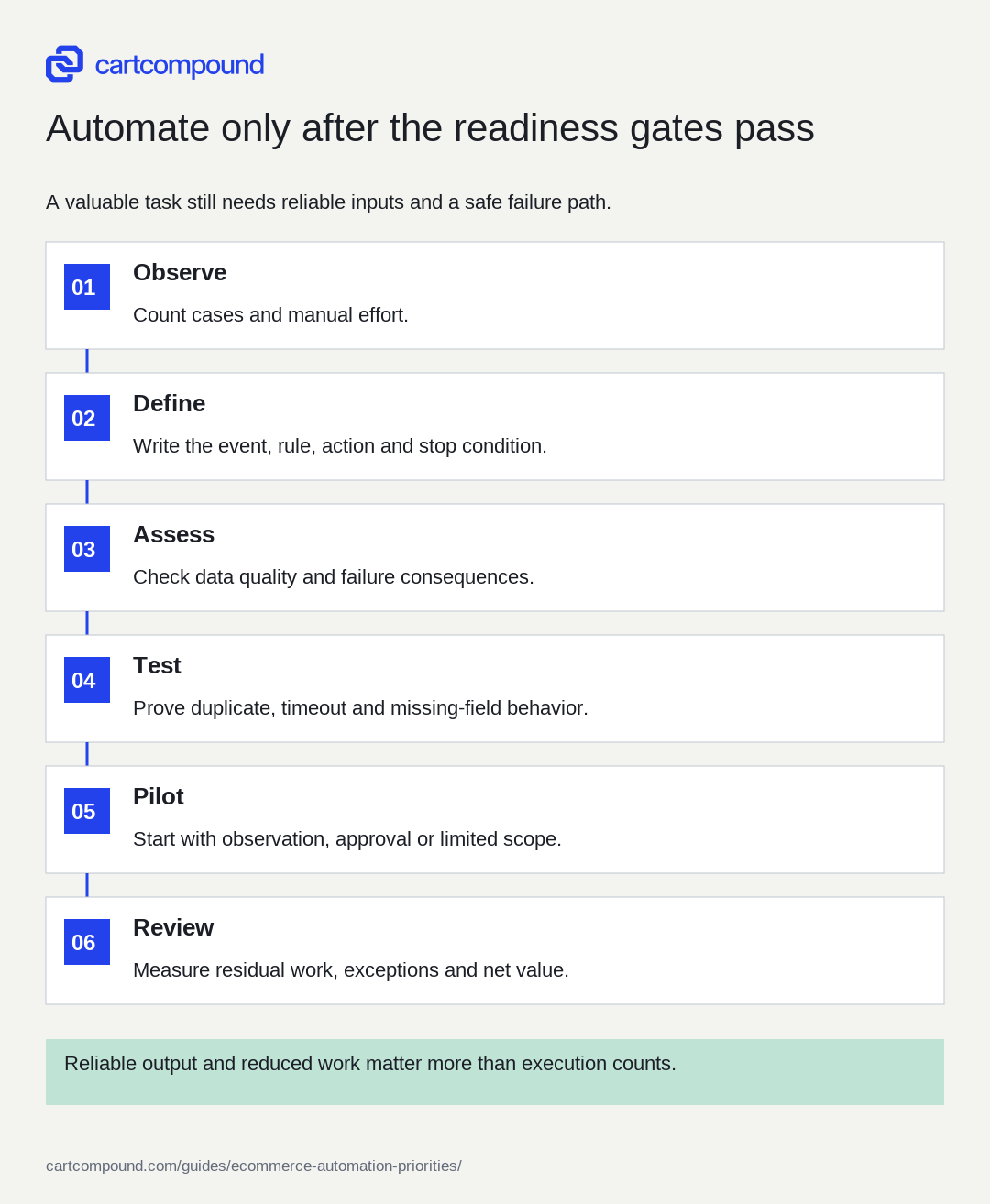
Automate only after the readiness gates pass
A valuable task still needs reliable inputs and a safe failure path.
- ObserveCount cases and manual effort.
- DefineWrite the event, rule, action and stop condition.
- AssessCheck data quality and failure consequences.
- TestProve duplicate, timeout and missing-field behavior.
- PilotStart with observation, approval or limited scope.
- ReviewMeasure residual work, exceptions and net value.
Reliable output and reduced work matter more than execution counts.
Use the steps with your store data. Examples in this guide are illustrative unless a source is named.
Prioritize by value and readiness
On a small screen, swipe the table to see every column.
| Criterion | Question | Evidence to collect |
|---|---|---|
| Frequency | How often does the task occur? | Actual cases per complete period |
| Effort | How much work can really be removed? | Observed handling time and residual review |
| Input reliability | Are necessary facts present and timely? | Sample events and missing-field rate |
| Failure impact | What happens when it is wrong or duplicated? | Customer, money and inventory consequences |
| Maintainability | Who can diagnose and update it? | Named owner and runbook |
Start with a high-frequency, clear-rule task that creates a reversible internal result, such as flagging a reconciliation exception. Defer tasks whose policies remain disputed or whose inputs are unreliable. Avoid a single weighted score that hides a hard failure: a workflow without an exception owner is not ready simply because its estimated time saving is attractive.
Calculate net savings with realistic inputs
Use cases multiplied by manual minutes per case as a baseline, then subtract residual review, exception handling and routine maintenance. Include subscription and implementation costs separately. An illustrative workflow handles 200 monthly cases at three minutes each, producing a 600-minute manual baseline. If residual review uses one minute per case and maintenance uses 90 minutes, the potential net saving is 600 minus 200 minus 90, or 310 minutes monthly.
Those values are planning examples, not a typical ecommerce result. If exceptions consume another 120 minutes, the estimated saving falls to 190 minutes. At an illustrative $30 hourly labor value, 190 minutes is $95 of labor capacity before tool and implementation costs. Capacity is not automatically cash saved unless staffing or outsourcing spend changes. Use the calculation to compare options and set a review point. A workflow can still be valuable for faster detection or fewer errors, but describe those benefits separately and measure them rather than inflating the time-saving estimate.
Choose the tool after the contract is clear
Check native platform features and existing tools before adding another service. A store may already have suitable triggers, conditions and actions. Shopify's Flow workflow examples show inventory, merchandising and error-monitoring patterns. Use documented examples as implementation references, then verify the current capability and account access for the store.
Assess permissions, data movement, event latency, rate limits and monitoring. An external tool may be appropriate for cross-system work, but its extra connector becomes another dependency. Avoid sending full customer records when a minimal identifier and status are sufficient. Confirm how credentials are stored and who can edit workflows. Do not let a marketing automation gain broad financial or inventory permissions simply because its connector offers them. The appropriate tool is the smallest reliable system that can execute and explain the agreed workflow, including its exceptions.
Design for duplicates, delays and partial failure
Events can arrive late, repeat or describe a state that has since changed. Recheck the current source where the action depends on current state. Make repeated execution safe by identifying whether the intended result already exists. Use an appropriate idempotency mechanism for the integration rather than assuming a single event will always be delivered once.
Shopify's Flow action endpoint documentation describes idempotency keys for custom actions. The practical requirement is broader: a retry should not create duplicate customer messages, refunds or inventory adjustments. Plan for partial completion, such as a review ticket being created before a later status update fails. Keep enough execution state to resume or reconcile safely. Do not retry an irreversible action blindly because the first response timed out. A timeout can mean the action failed, or that it succeeded but the response was not received.
Work through an order-review example
Consider an illustrative workflow that finds orders missing a required delivery detail and creates an internal review task. It should not cancel the order or email the customer automatically during the pilot. The trigger supplies an order ID; the workflow verifies that the relevant detail is still missing, checks whether an open review task already exists and creates one with a minimal link to the authorized order record.
A duplicated event should leave one task, not several. A later address correction should prevent a new unnecessary task or close the existing one under the chosen policy. If the task system is unavailable, the failure should enter a visible queue with an owner. After the team verifies the observation results, it can decide whether a narrowly worded customer request is appropriate under a separate approved step. This sequence removes repetitive detection while preserving human judgment over an ambiguous, customer-facing decision.
Test normal and uncomfortable cases
On a small screen, swipe the table to see every column.
| Test | Expected outcome |
|---|---|
| Complete valid event | One correct intended result |
| Duplicate event | No duplicate effect |
| Missing required field | Visible exception instead of a guess |
| Downstream timeout | Safe retry or reconciliation path |
| State changes while waiting | Current-state check prevents an obsolete action |
| Permission revoked | Failure is visible and escalated |
Shopify's Flow troubleshooting guide recommends testing before activation and distinguishes runtime failure conditions. Apply the same discipline regardless of tool. Use approved test data and avoid contacting real customers or changing money during a logic test. Save the expected and actual outcomes. A successful normal-path demonstration is insufficient for a workflow whose failures can quietly accumulate outside the dashboard.
Launch in stages and keep an exception queue
Begin in observation mode where possible, comparing proposed actions with the manual process. Then move to approval mode or a limited scope before full automation. Choose scope by product group, order type or another appropriate boundary. Avoid making a workflow live across every market simply because a few test events passed.
Every run should have a traceable identifier, status, timestamp and enough context for diagnosis. Keep personal data minimal and access controlled. Define alert thresholds that require action rather than sending a notification for every expected skip. Shopify's run-monitoring guidance provides a platform-specific starting point. Review unresolved exceptions and stale queued work, not just green completion counts. A workflow can complete successfully while producing the wrong business result, so sample its output after launch and after changes to source systems.
Design the handoff for the person handling exceptions
An exception queue should contain the minimum information needed for a person to decide what to do next: workflow and run identifiers, affected business record, failed step, current status, relevant evidence and safe recovery options. Avoid dumping an entire technical payload into a shared channel and expecting someone to interpret it. The operator needs to know whether the intended action never started, completed partly or may have completed despite a timeout.
Write a recovery decision tree for the highest-risk step. If the action is known not to have occurred, retry may be appropriate after correcting the cause. If its outcome is unknown, inspect the destination before repeating it. If it partially completed, reconcile or resume from a supported point rather than restarting every step blindly. Record the evidence used and the person approving a consequential recovery. A manual retry button is a capability, not proof that repeating the whole workflow is safe in every state.
Set ownership during absence and busy periods. An exception assigned to a person who is away for a week can silently become a customer problem even while the automation dashboard looks healthy. Define severity, response expectation and escalation in terms the operations team can maintain. Use alerts for conditions requiring action and aggregate routine expected skips into a review report. Test the handoff by asking an operator who did not build the workflow to resolve a controlled failed case using only the runbook. If they cannot identify the safe next step, improve the documentation or simplify the workflow before expanding it. Maintainability is demonstrated by successful recovery, not by the creator remembering how every block works.
Review value and retire weak automation
Compare the actual manual baseline with residual work, exceptions, maintenance and observed errors. Check whether staff truly stopped doing the automated step or now perform the same work plus checking the software. Investigate that duplication before declaring a saving. Keep a clear pause, rollback and retirement procedure. An abandoned workflow with active permissions and no owner is operational debt.
Your next action is to document one recurring task and run it through the readiness table. Choose a small, reversible result, test duplicate and missing-data cases, and assign a real exception owner. Review after a complete operating cycle before expanding. Automation earns its place when it removes verified work or improves a measured outcome while keeping failures visible. The number of workflows, connected apps or executions is not a useful success metric by itself.
Your action checklist
Use this to decide what to do next. Your checks stay on this page and are not sent or saved.
0 of 5 checked
Common questions
What should a small ecommerce store automate first?
Start with frequent, well-defined work using reliable inputs and reversible outputs, such as internal exception detection. Avoid beginning with ambiguous policies or irreversible financial actions.
Does a completed workflow mean the task was correct?
No. Completion can mean the software executed successfully. Sample the business output and compare it with the intended rule.
How do I avoid duplicate effects?
Use stable event or action identifiers, check existing results, and implement the supported idempotency mechanism. Test timeouts and retries before enabling consequential actions.
Sources and review
Source documentation checked October 27, 2026. Platform features and interfaces can change. The recommendations and illustrative examples explain how to make the decision; they do not promise results.
- Examples of workflows in Shopify Flow
Native workflow patterns and error monitoring examples. - Create Flow action endpoints
Custom action idempotency and request processing. - Troubleshooting errors in Shopify Flow
Testing and runtime error handling. - Finding and monitoring workflow runs
Run monitoring and inspection.
Talk through your store question
Bring one problem you want to solve.
A free 20-minute call with Hamid can help you decide what to investigate next.
Book a free 20-minute call
About the author
Hamid Khan
Hamid co-founded CartCompound and works with ecommerce founders on their stores and growth priorities.
Profile and guides